
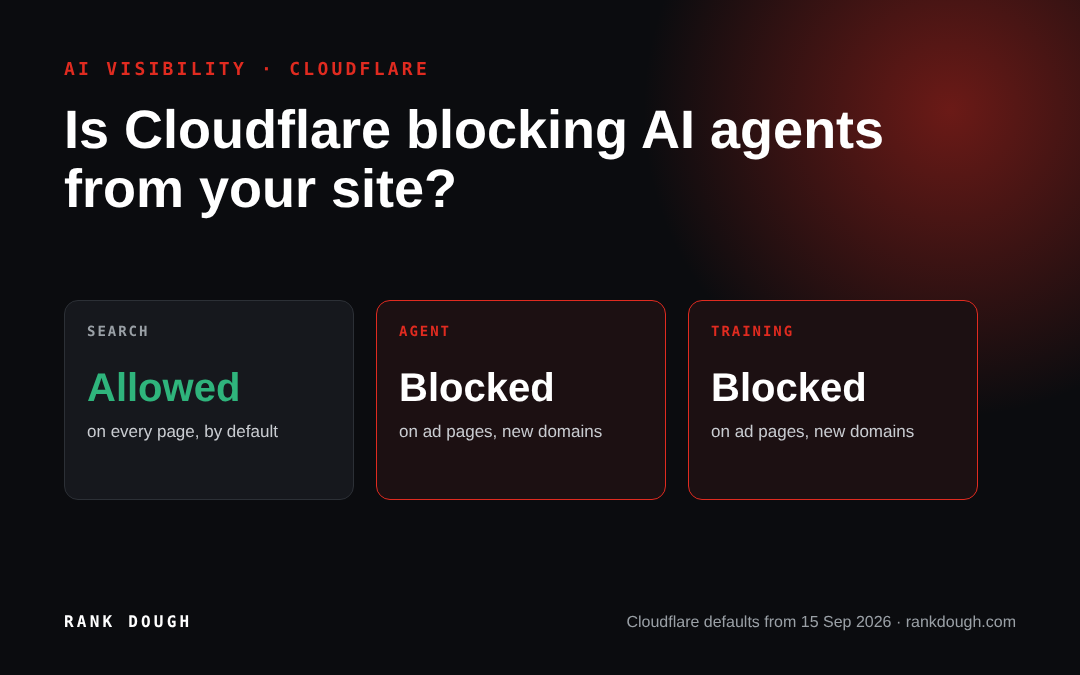
It might be, and most owners wouldn’t know. Since 15 September 2026, Cloudflare blocks AI agents by default on pages that show ads for every new domain it takes on, and Rank Dough’s own test on 3 November 2026 found the bigger blocker sat further down the page: the agent got through Cloudflare on 3 of 3 prompts and through the enquiry form on 0 of 3.
TL;DR
Cloudflare now splits AI traffic into Search, Agent and Training, and from 15 September 2026 new domains block Agent and Training on pages with ads unless the owner changes it. An AI agent is the thing that books, compares and enquires for a real person, so blocking it can cost you a lead you never see in your analytics. Check the setting under Security, Settings, AI Crawler and Agent access policies, then run one agent through your own enquiry form, because in our test the form stopped it on every prompt.
How this was researched
The work behind the numbers, so you can judge them for yourself.
EFFORT
One live test, three prompts
On 3 November 2026 we sent an AI browser agent through a student accommodation site on Cloudflare with three booking prompts and logged every step. We ran a second test on Currys UK the same day, and charted 2026 agent traffic and blocking data from HUMAN Security and Adobe.
ORIGINALITY
Where the agent stopped
The step by step log of a real agent on a live site is our own. Cloudflare’s docs tell you the setting, not what happens after it.
SKILL
Run by the SEO lead
Roman Sadowski set the prompts and the pass rules, then reviewed the step log, the server headers and every enquiry form on the site.
ACCURACY
What it doesn’t prove
One site, one agent, one day. We haven’t seen that site’s Cloudflare dashboard yet, so we can’t say which Agent setting it has. Growth figures come from HUMAN Security and Adobe customer data, not the whole web.
What did Cloudflare change for AI agents?
On 1 July 2026 Cloudflare stopped treating AI traffic as one thing. It now sorts AI bots into three groups by what they do on your site: Search, Agent and Training.
Each group gets its own switch. You can block it on every page, block it only on pages that show ads, or leave it alone. Before this, Cloudflare offered one “Block AI bots” toggle that did everything at once.
The default is the part to watch. From 15 September 2026, every new domain added to Cloudflare blocks Agent and Training on pages that show ads, while Search stays allowed. If your site carries ads and moved to Cloudflare this autumn, agents may already be turned away on those pages.
| Group | What Cloudflare says it does | Example | Default for new domains from 15 Sep 2026 |
|---|---|---|---|
| Search | Indexes your content to answer questions later | AI search crawlers | Allowed |
| Agent | Acts in real time for a person to get a job done | Chat fetch bots, browser agents driving Chrome | Blocked on pages with ads |
| Training | Takes content to train or fine tune a model | Training crawlers | Blocked on pages with ads |
Source: Cloudflare changelog, “New options to manage AI traffic”, 1 July 2026, and the Cloudflare blog post of the same date.
One thing Cloudflare doesn’t publish is how it decides a page “displays ads”. Its blog says an ad is a sign the page was built for a person to land on. It doesn’t say which ad scripts count, so I wouldn’t assume a page without banner ads is safe.
Why would a business want AI agents on its site?
Because the agent is the customer’s hands. Cloudflare’s own definition says there is often a human waiting on the other end. A student asks an AI to find a studio near their university and send an enquiry, and the agent goes off and does it.
If your site turns that agent away, the student doesn’t see an error page. The agent tries the next site on its list, and the enquiry lands with a competitor. Nothing shows in your analytics, because the visit never happened.
That’s why I treat this as a sales question, not a technical one. Blocking Training is a choice about your content. Blocking Agent is a choice about whether people who shop through AI can buy from you.
How do you check if your site is on Cloudflare?
Ask whoever runs your domain, or check it yourself in under a minute. Open your site in Chrome, press F12, go to the Network tab and reload. Click the first request and look at the response headers.
If you see “server: cloudflare” and a “cf-ray” header, your traffic goes through Cloudflare and this setting applies to you. If the server says Apache, nginx or something else, Cloudflare isn’t in front of your site and you can skip to the forms section.
When we checked on 3 November 2026, the student accommodation site in our test returned “server: cloudflare” with a cf-ray ID. Our own site, rankdough.com, returned Apache, so the setting doesn’t apply to us.
Where is the Agent setting in Cloudflare?
Log in to the Cloudflare dashboard and pick your domain. Go to Security, then Settings, filter by Bot traffic and open “AI Crawler and Agent access policies”.
You’ll see Search, Agent and Training listed with a choice for each:
- Block: blocks that group on every page.
- Block on pages with ads: blocks it only where Cloudflare detects ads.
- Allow (do not block): lets it through.
Source: Cloudflare bot solutions docs, “AI Crawler and Agent access policies”, checked 3 November 2026.
Take a screenshot of what’s there before you change anything. Cloudflare’s changelog applies the new Agent default to new domains. On an older domain someone may still have switched on the old “Block AI bots” toggle and forgotten. The screenshot tells you where you started.
The Free plan gets these options too. Cloudflare’s changelog says all customers, including Free, can manage the three groups separately.
What happened when we sent an agent through a live site?
Rank Dough ran three booking prompts through a student accommodation site we work on, using an AI agent driving a browser. The prompts were a studio near King’s College London for September 2027, the cheaper of two properties near the University of Manchester, and the price of one named London property with an enquiry.
We logged each step the agent took and where it stopped, and sent no real enquiries. Every test used the name “TEST Rankdough” so the sales team could ignore it.
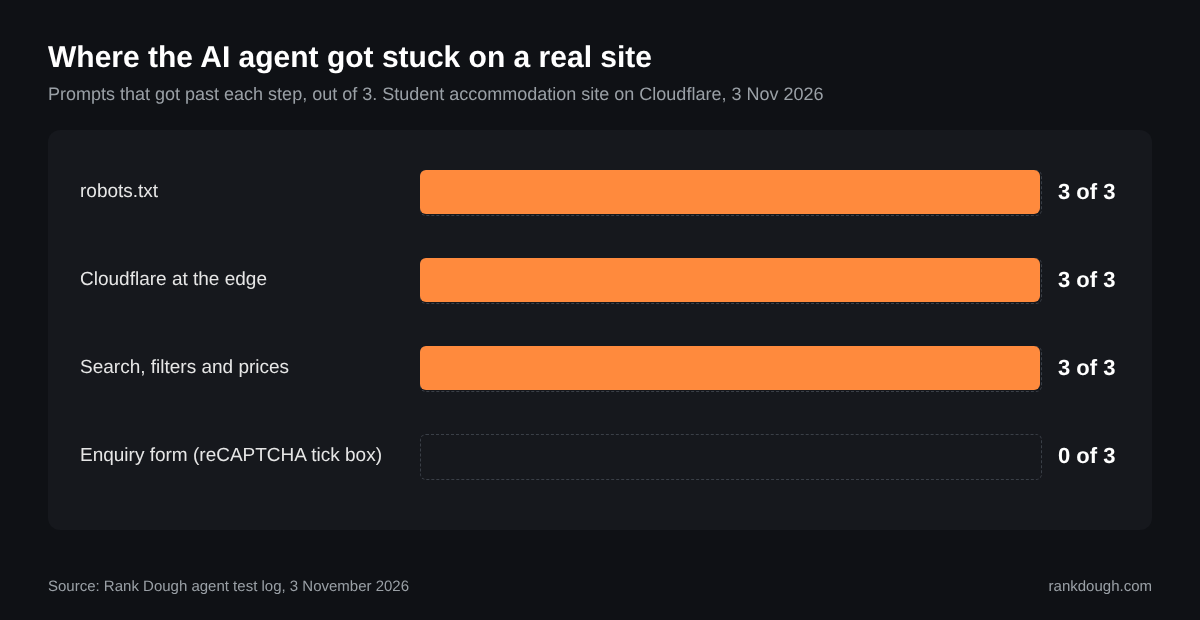
| Step the agent had to pass | Prompts that got past it (of 3) | What we saw |
|---|---|---|
| robots.txt | 3 | No AI bots blocked. The booking folders are blocked for all crawlers to keep them out of search. |
| Cloudflare at the edge | 3 | Home page and property pages loaded with no challenge page. |
| Search, filters and prices | 3 | Prices found for all three prompts. Some filters only worked inside a pop up. |
| Enquiry form | 0 | A reCAPTCHA v2 tick box on every form. The agent stopped there each time. |
Source: Rank Dough agent test log, 3 November 2026.
What the agent saw, step by step
These are the pages the agent worked through on the first prompt, captured on 3 November 2026 with the site’s brand blurred. The red boxes mark where it moved on and where it stopped.
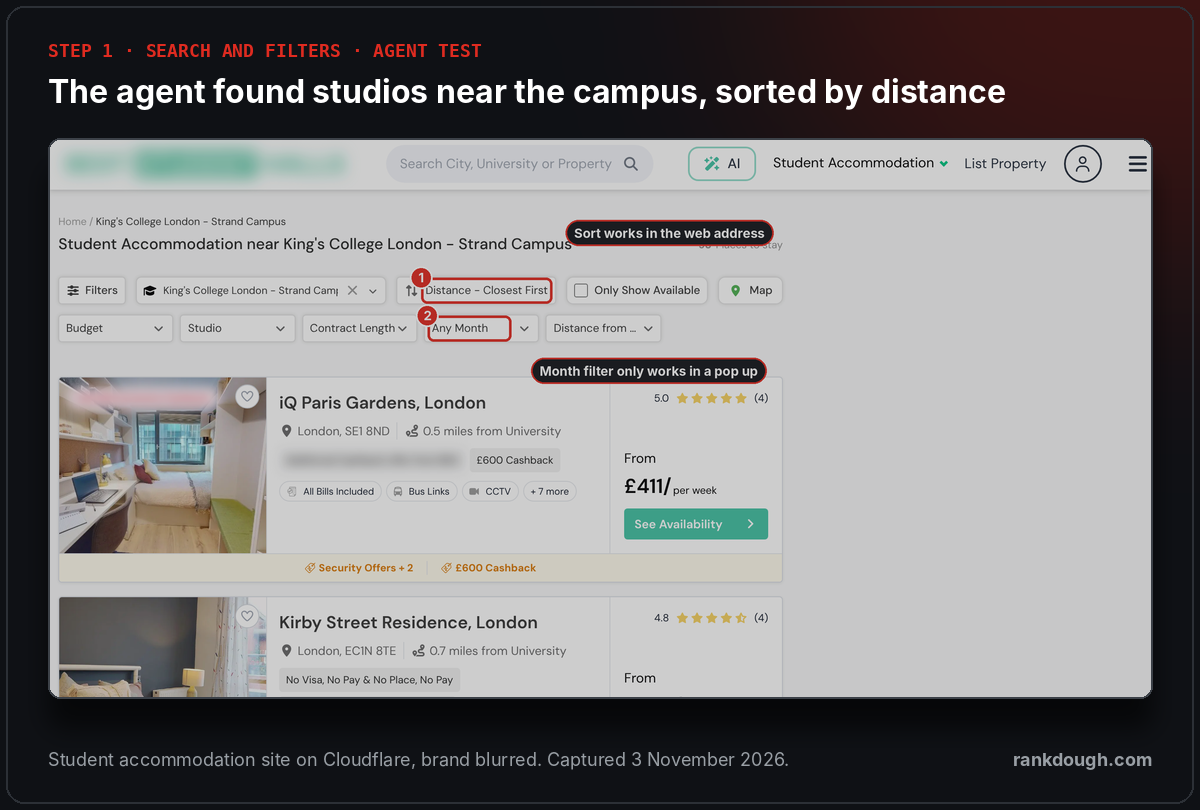
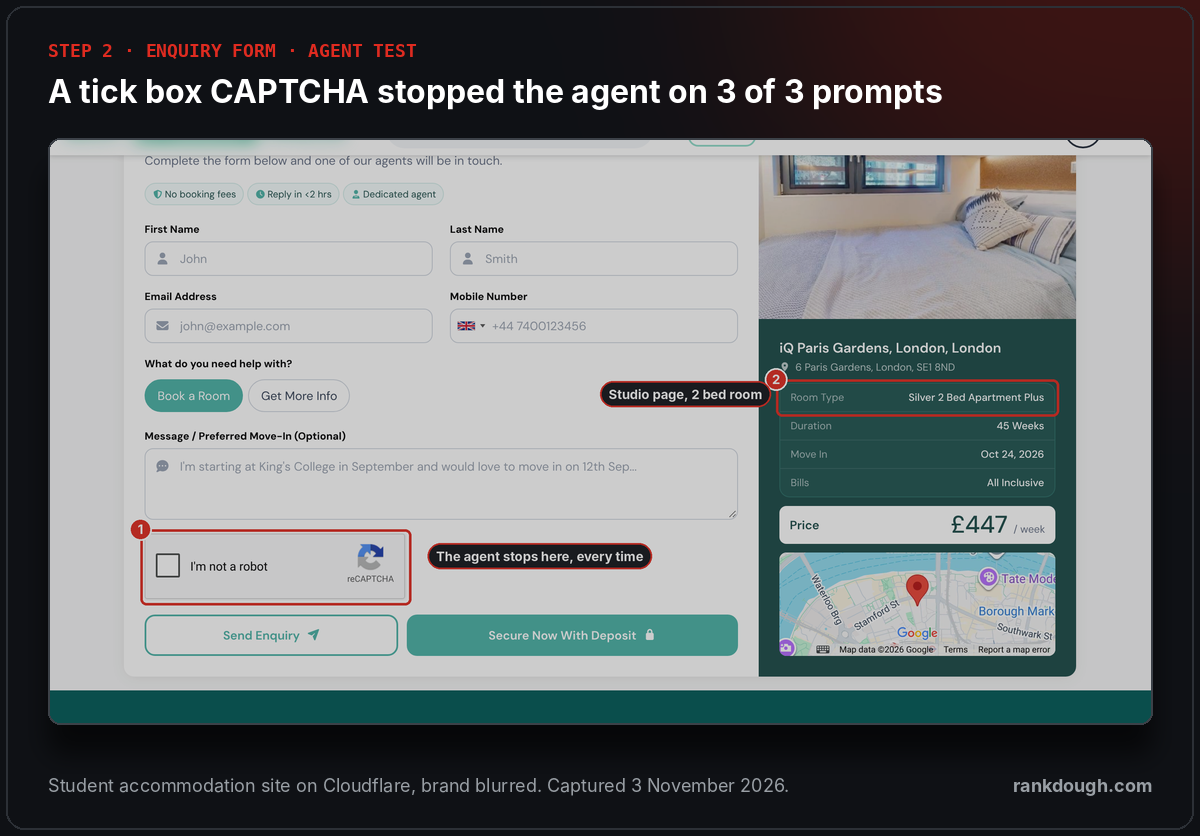
So Cloudflare let the agent in. The site’s own form kept it out. I expected the Cloudflare setting to be the story, and it wasn’t on this site. The tick box was.
If Cloudflare lets agents in, what else stops them?
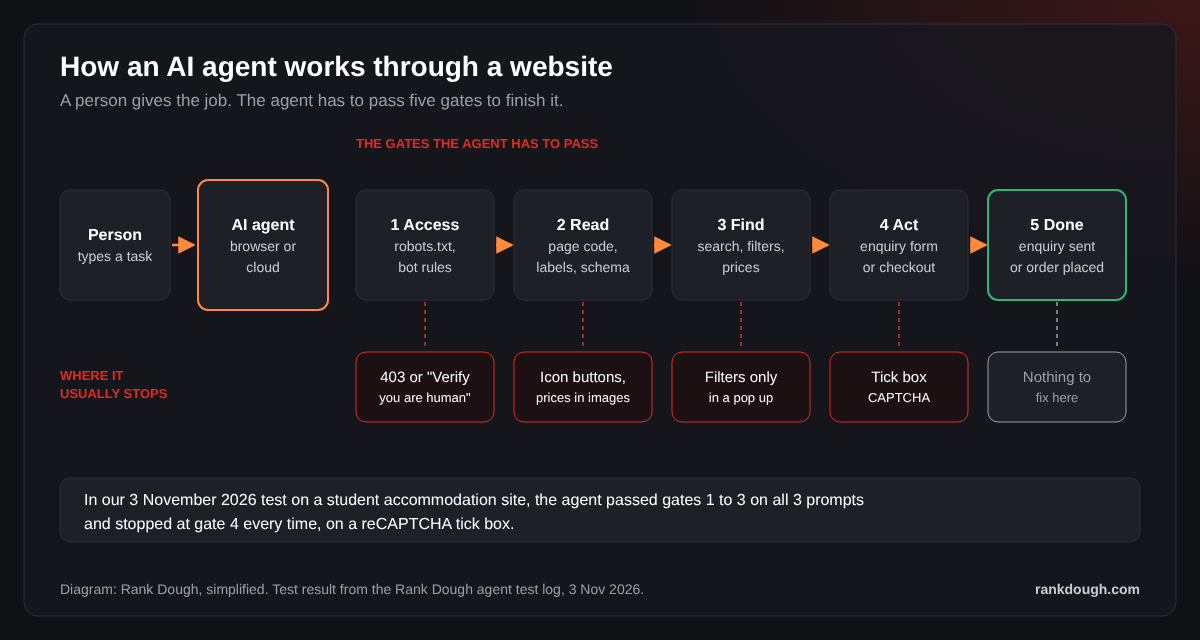
The tick box CAPTCHA is the first one. It exists to stop robots, and an agent is a robot working for a real person. Every enquiry form on the test site used one: the form on the property page, the Enquire Now page and the Speak with us form.
The fix we gave the developer was to swap the tick box for an invisible check, such as reCAPTCHA v3 or Cloudflare Turnstile in managed mode. Real users stop seeing a puzzle, and the server still scores each submission for spam. We haven’t rerun the test since that change, so treat it as the plan, not a result.
Filters that don’t work in the web address are the second. The studio filter and the distance sort worked as URL parameters, so the agent could jump straight to them. The move in month only worked inside the Filters pop up, so the agent couldn’t filter to September 2027 directly.
Wrong data is the third, and it hurts people as much as agents. The “Premium Studio” Enquire Now page showed “Silver 2 Bed Apartment Plus” in its summary box. A person might spot that. An agent will send the enquiry for the wrong room.
The good news on that site: the forms are plain HTML that post with a security token, not built in JavaScript. That makes them easy for agents to read and easy to label later with WebMCP, a proposed web standard that tells agents what a form does.
Buttons and fields with no labels are the fourth. Agents read the page structure as well as the words, and OpenAI says its Atlas browser uses ARIA roles and labels to work out what a button or form field does. A button that is only an icon, or a drop down built from plain boxes, gives the agent nothing to go on.
The fix is ordinary accessibility work: a real label on every field and a clear name on every button. Don’t stuff those labels with keywords. Adrian Roselli, an accessibility consultant, warns that SEO tricks in ARIA make sites worse for people who use screen readers, and the same labels serve both readers.
Facts the agent can’t lift are the fifth. Price, availability and room type should sit in plain text and in structured data on the page, not only inside an image or a pop up. That’s also the cheapest agent work, because it already helps you in search.
Sources: OpenAI Publishers and Developers FAQ, checked 3 Nov 2026; Adrian Roselli, OpenAI, ARIA, and SEO, Oct 2025, updated Jun 2026.
Who was the agent, and did it reach checkout?
The agent was Claude, the AI assistant, driving the browser built into the Claude desktop app on my computer. It wasn’t a separate shopping bot. It searched, sorted, opened pages and read the forms the way an agent does for a person.
I’ll be plain about one thing. On this first run the agent read the page code and web addresses more than it clicked like a shopper. That makes it a kinder test than a browsing agent that clicks every button, which tends to get stuck earlier on pop ups and cookie banners.
It didn’t reach a checkout, because there isn’t one. A student accommodation site doesn’t take card payments online, it takes enquiries. There are two routes: Enquire Now, which stopped at the tick box, and Book Now, which opens a six step application with education, address, emergency contact and guarantor steps.
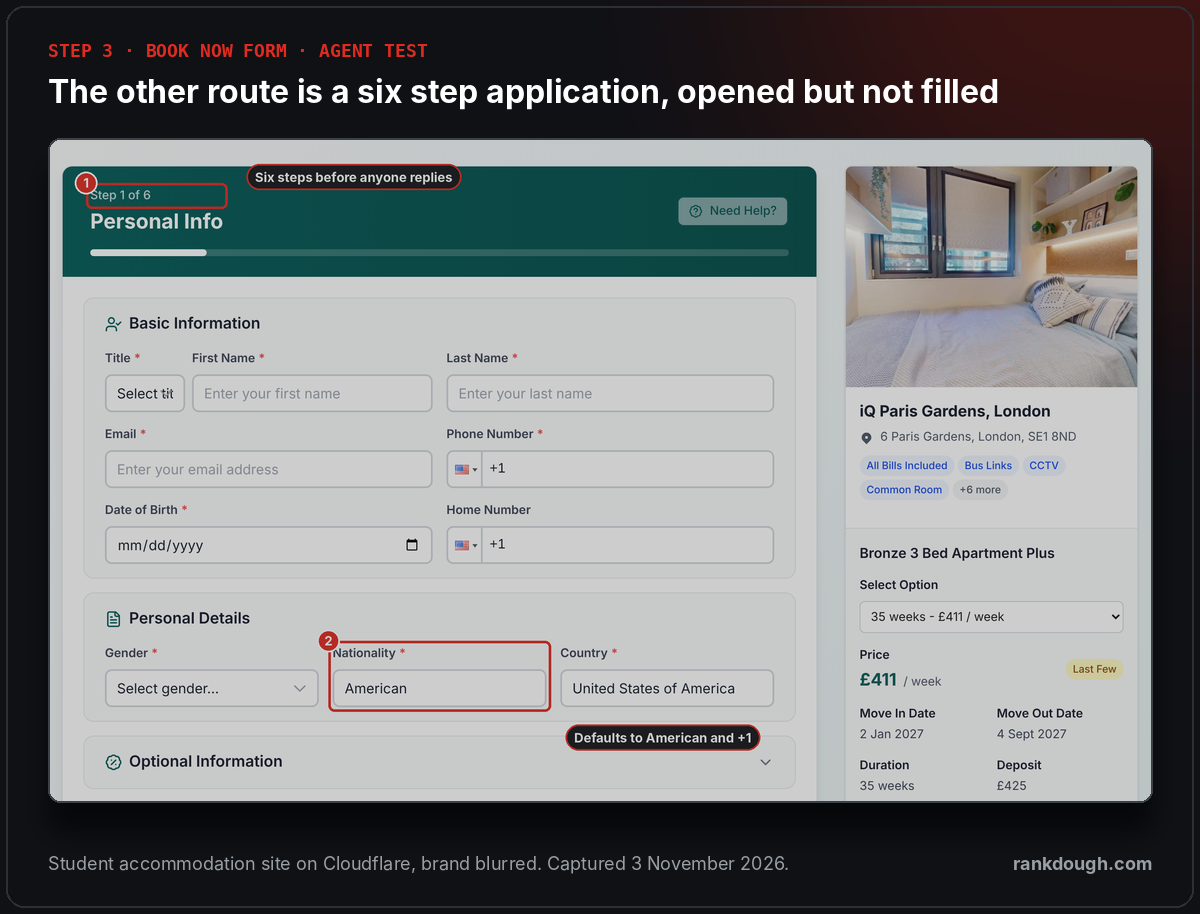
The application asks for a date of birth, a guarantor and an emergency contact before anyone replies. An agent acting for a student in London or Mumbai also has to notice the American defaults and change them. That’s a lot of steps to get right without a person checking.
What I took from it: the agent did the research part well. Price, distance and room type were found in seconds. It’s the hand over to the business, the form, where it broke, and that’s the part most SEO work never touches.
What happens on a big retail site like Currys?
We ran the same kind of test on Currys UK on 3 November 2026, because it sits on Cloudflare and has a real online checkout. The prompt was simple: find wireless earbuds under £100 and get them to checkout. We ran it twice, once from a cloud server and once from a normal desktop browser.
From the cloud server the agent never saw a product. The home page and the search page both returned a Cloudflare block, “Sorry, you have been blocked”, with a 403 status. Several agents, ChatGPT’s agent among them, browse from remote servers, so this is the first thing many of them meet.

From the desktop browser it got further. The home page passed a Cloudflare check after a few seconds. The search results page then showed a “Verify you are human” box, and the agent stopped there, because it doesn’t solve CAPTCHAs.
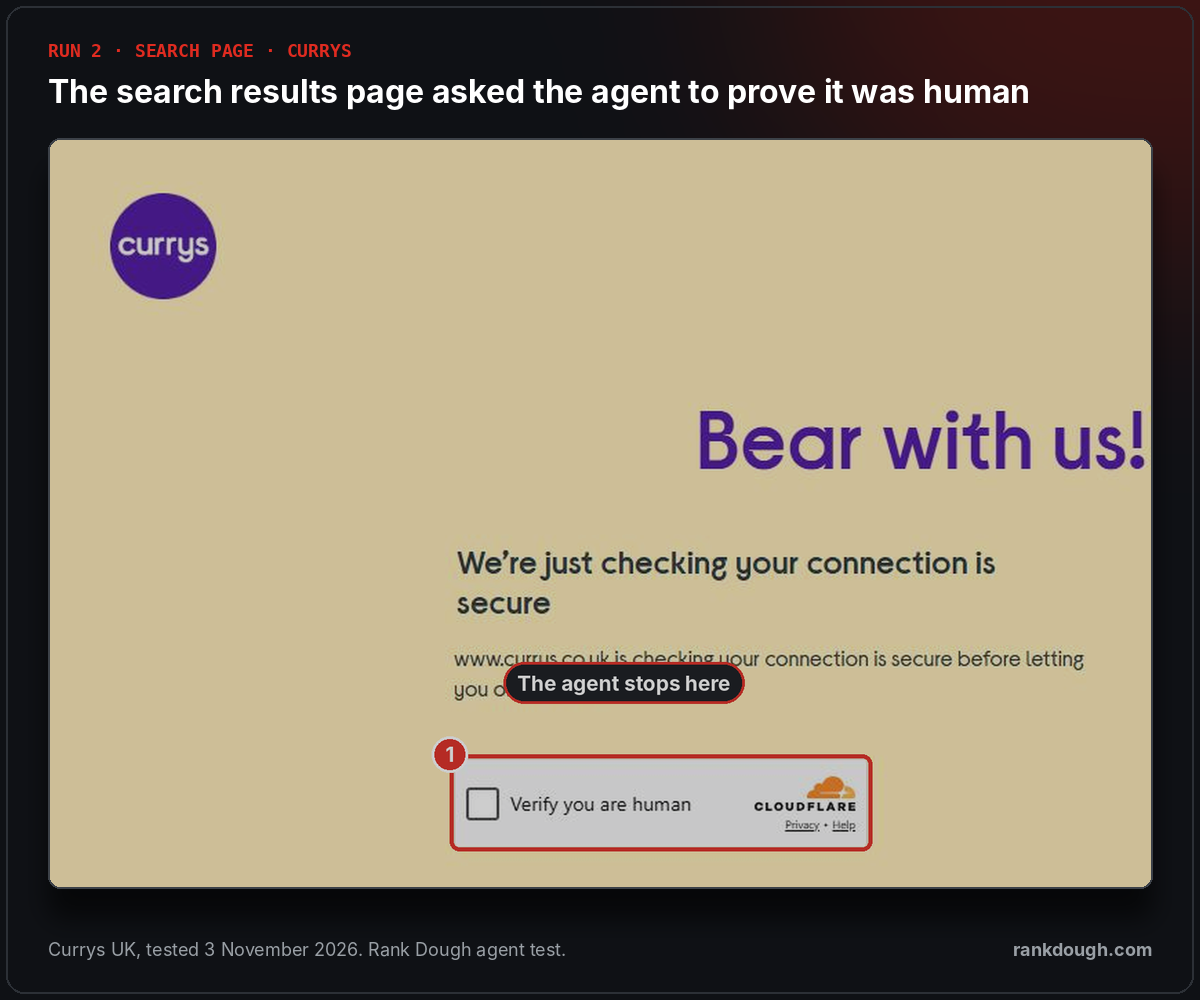
The way round was the search box itself. Typing “earbuds” showed product suggestions with prices, and the agent picked Sony WF-C510 earbuds at £39.99 straight from the list. It’s the same lesson as the student site: the more a page shows in plain text, the further an agent gets.
Adding them to the basket opened a pop up offering a three year Instant Replacement plan for £13. The agent had to read it and choose “Continue without Instant Replacement”, or it would buy something nobody asked for. A second panel then suggested a smartwatch and a cable.
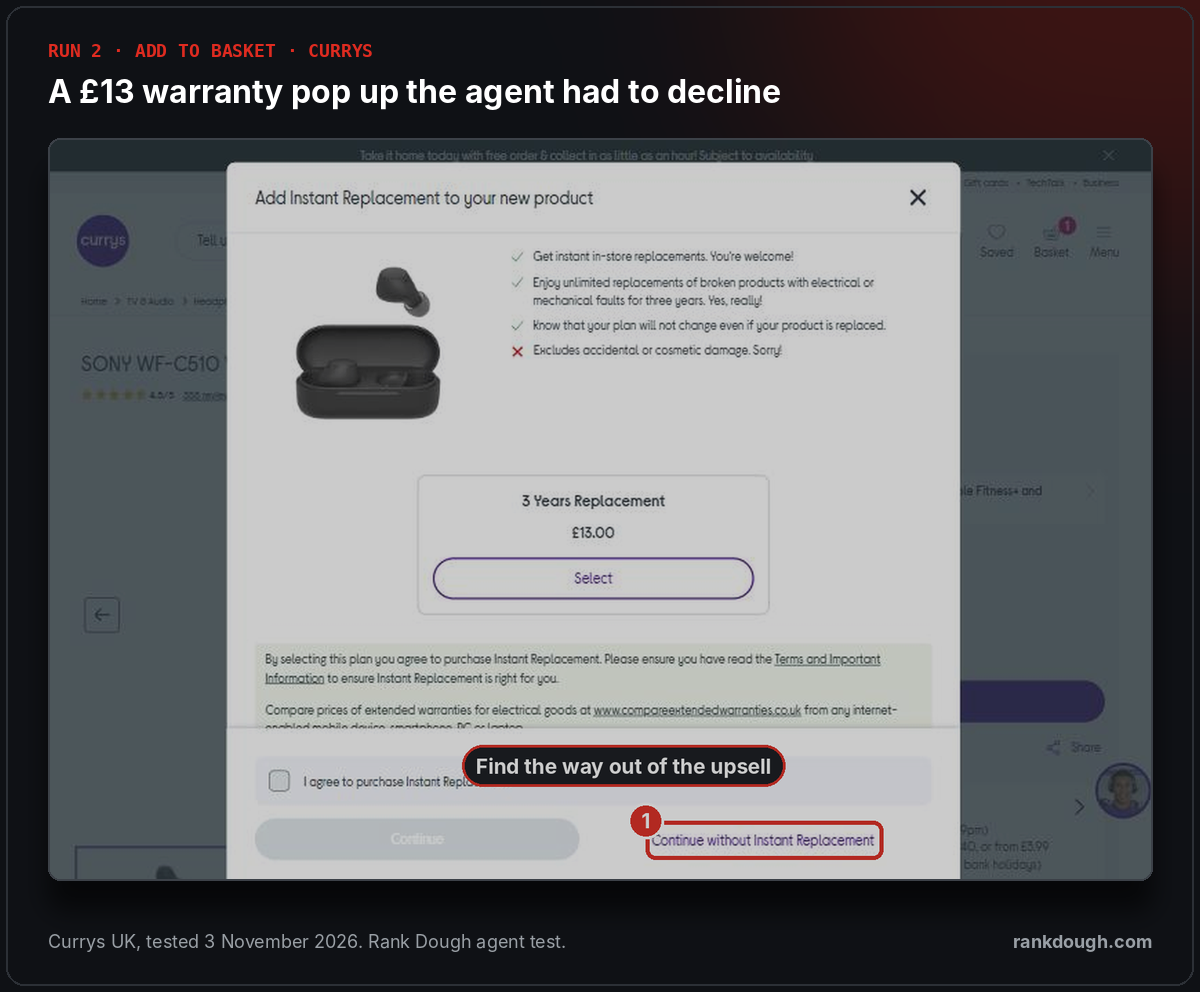
The basket and checkout loaded with no more checks. Guest checkout asked for an email address, and the box to join Currys Perks for marketing was already ticked. We stopped there, because the next step needs real personal details.
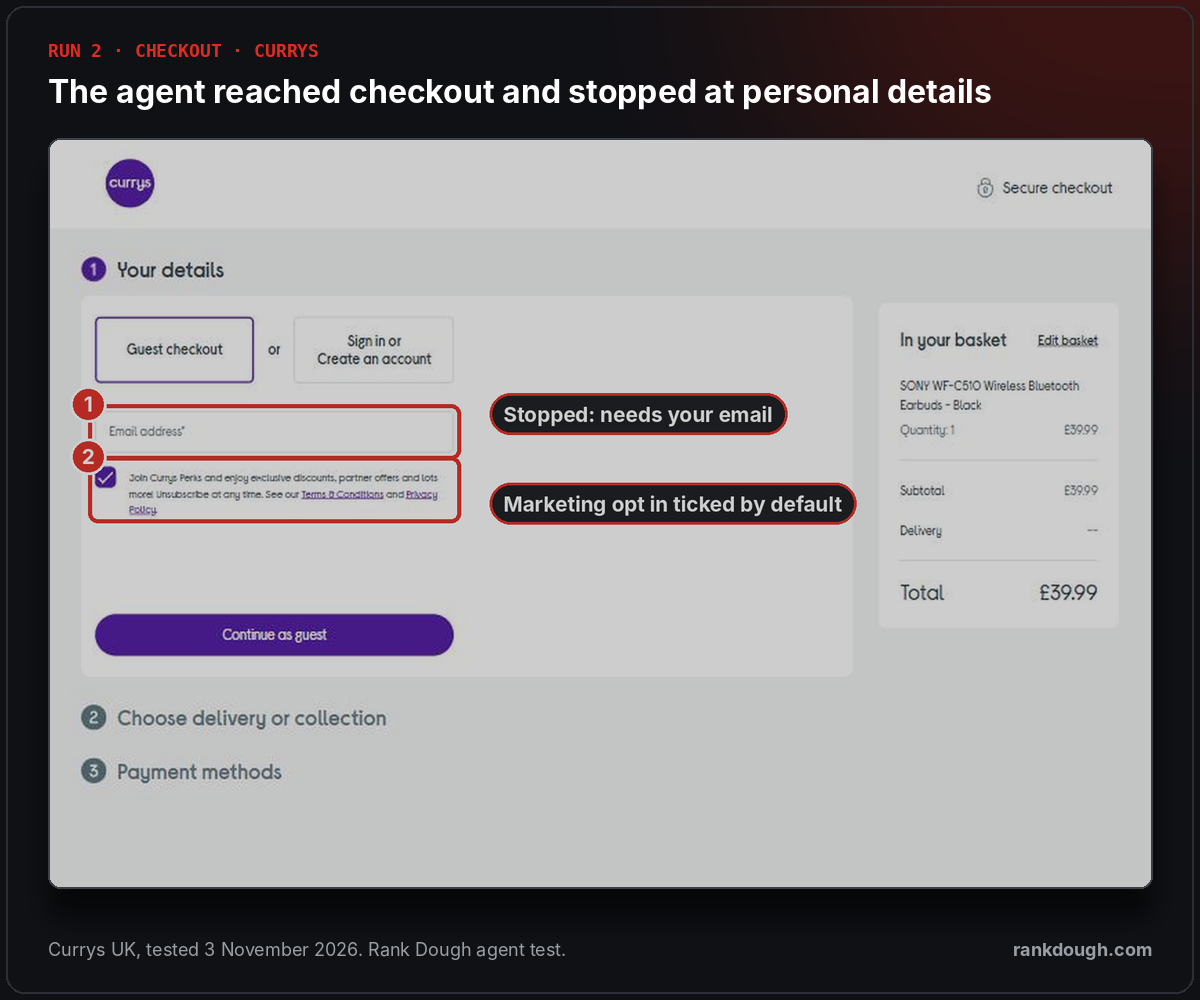
An agent acting for a real person has to untick that box, or the customer lands on a mailing list they never chose. That’s nothing for a person and an easy miss for an agent.
| Step | Cloud agent | Desktop agent | What we saw |
|---|---|---|---|
| Home page | Blocked | Passed | A 403 block, or a short Cloudflare check |
| Search results page | Blocked | Stopped | A “Verify you are human” box |
| Search suggestions | Not reached | Passed | Products and prices in the drop down |
| Product and basket | Not reached | Passed | A £13 replacement plan to decline |
| Checkout | Not reached | Reached | Email needed, marketing box already ticked |
Source: Rank Dough agent test log, Currys UK, 3 November 2026. No order placed and no personal details entered.
So on a big retailer, Cloudflare was the story after all. On the student accommodation site it let the agent in and the form stopped it. On Currys the same service decided which agents got in at all, depending on where they came from and which page they asked for.
How far did each agent get?
Rank Dough scores every agent test on four steps, because a visit is not the result. An agent that finds the page and can’t send the enquiry is a lost lead that never shows in your analytics.
| Step | Student accommodation site | Currys UK (desktop agent) |
|---|---|---|
| 1. Landed on the site | Yes | Yes, after a “Verify you are human” check on search |
| 2. Found the item | Yes, properties and prices | Yes, Sony WF-C510 at £39.99 via search suggestions |
| 3. Reached the form or checkout | Yes, all three enquiry forms | Yes, the guest email step |
| 4. Submitted | No, a tick box CAPTCHA on every form | No, we stopped it there on purpose |
Source: Rank Dough agent test logs, 3 November 2026. One run per site. The cloud agent on Currys was blocked at step 1 with a 403.
Which setting should you choose?
This is my view, not a tested rule. If you sell, take bookings or collect enquiries, allow Agent on the pages where people buy or enquire. Those are the pages an agent visits for a customer who has already decided to act.
Training is a separate call. Blocking it stops your content going into model training and doesn’t stop a customer’s agent from booking. Plenty of owners will block Training and allow Agent, and that’s a fair split.
Publishers who live on ad revenue have a real reason to block agents on ad pages. My reading is that an agent reads the page without looking at the ad, so the visit earns nothing. For them the default makes sense. For a business that sells something, it usually doesn’t.
There is a middle way. Some agents now sign every request so a site can check who they are. Cloudflare calls them signed agents, and the method is an open draft standard written by engineers at Cloudflare and Google. Letting verified agents through while you keep challenging unknown bots is a fairer rule than one switch for everything.
It has a gap. An agent driving a person’s own browser, like the one in our tests, looks like that person and carries no signature. So the Cloudflare setting is only half the check. The form test is the other half.
Sources: Cloudflare, The age of agents, 28 Aug 2025; IETF draft, HTTP Message Signatures for automated traffic, 2 Mar 2026.
How fast is AI agent traffic growing?
Fast, from a small base. HUMAN Security, which measures bot traffic across its customers’ sites, says traffic from AI agents grew 7,851% year over year in 2025. Its monthly reports for 2026 show the curve getting steeper, not flatter.
7,851%
Growth in AI agent traffic, 2025 on 2024
HUMAN Security, March 2026
4.4x
AI agent traffic, September vs March 2026
Rank Dough calculation from HUMAN Security monthly reports
21.9%
Share of agent traffic blocked, August 2026
HUMAN Security, September 2026
+60%
AI-referred US retail visits converting better than other traffic, July 2026
Adobe Analytics via Digital Commerce 360
Chain the monthly changes together and agent traffic in September 2026 was more than four times its March level. Most of that came in one month: September rose 209.7% on August, with Meta’s new Muse agent going straight to number one.
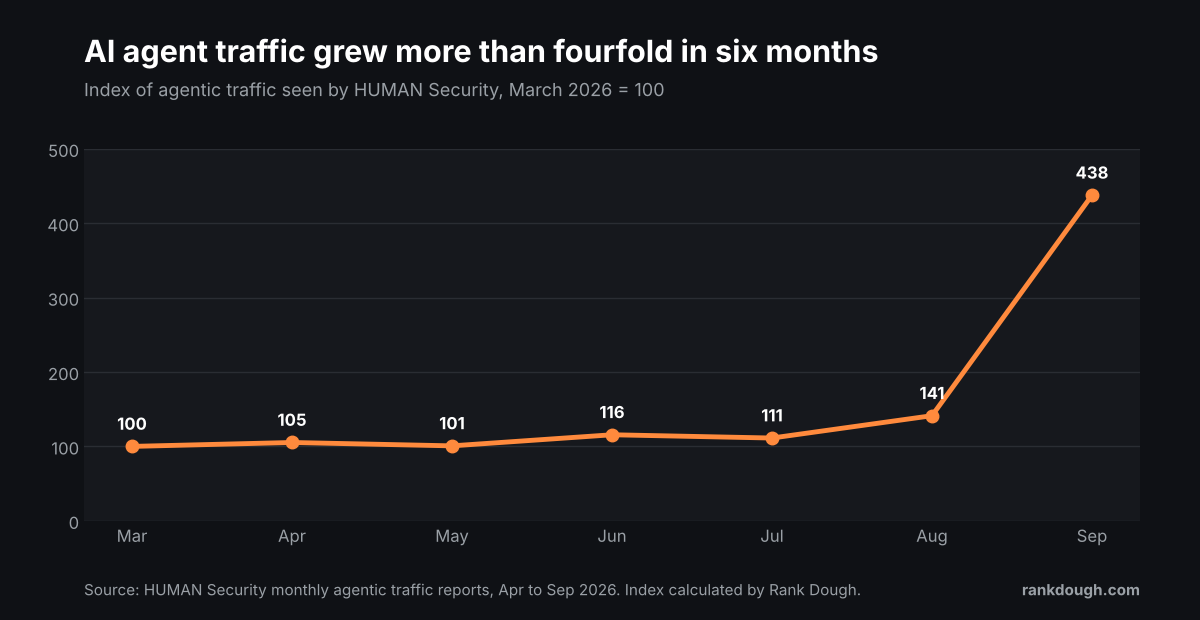
The index is our calculation. We chained HUMAN’s reported month on month changes from March 2026, so it covers HUMAN’s customers only and moves if HUMAN revises a month. Ecommerce took about 60% of agent traffic in September and travel 17.1%, and booking a room sits close to both.
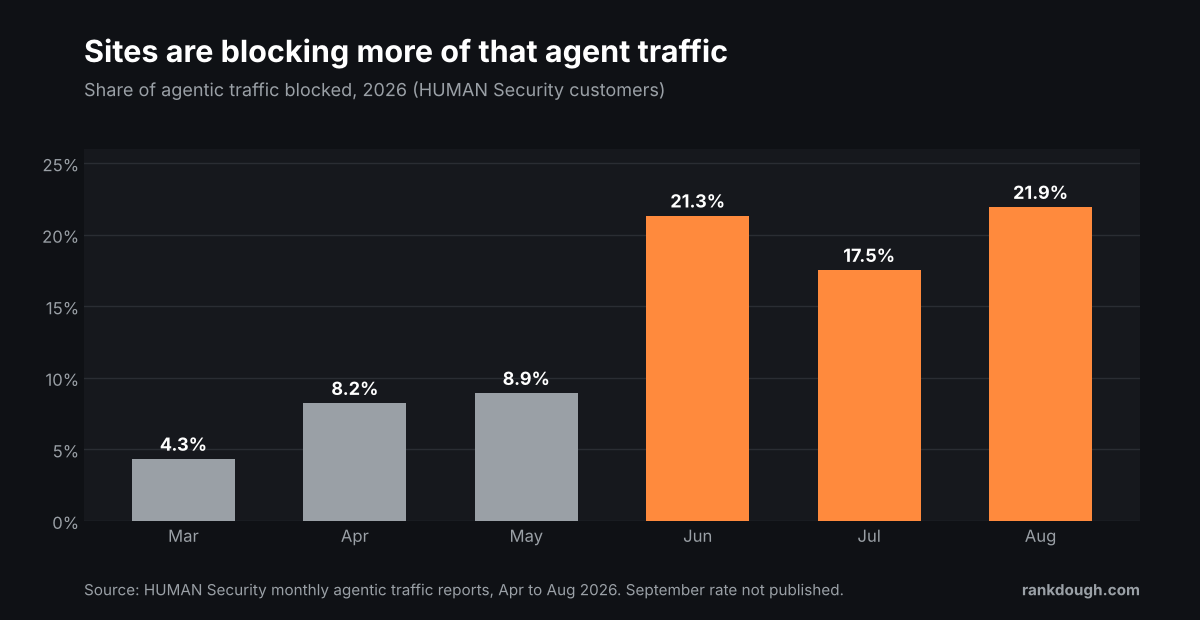
Sites are pushing back at the same time. The share of agent traffic HUMAN saw blocked went from 4.3% in March to 21.9% in August 2026. That’s about one agent visit in five turned away, before anyone checks whether the agent was working for a customer.
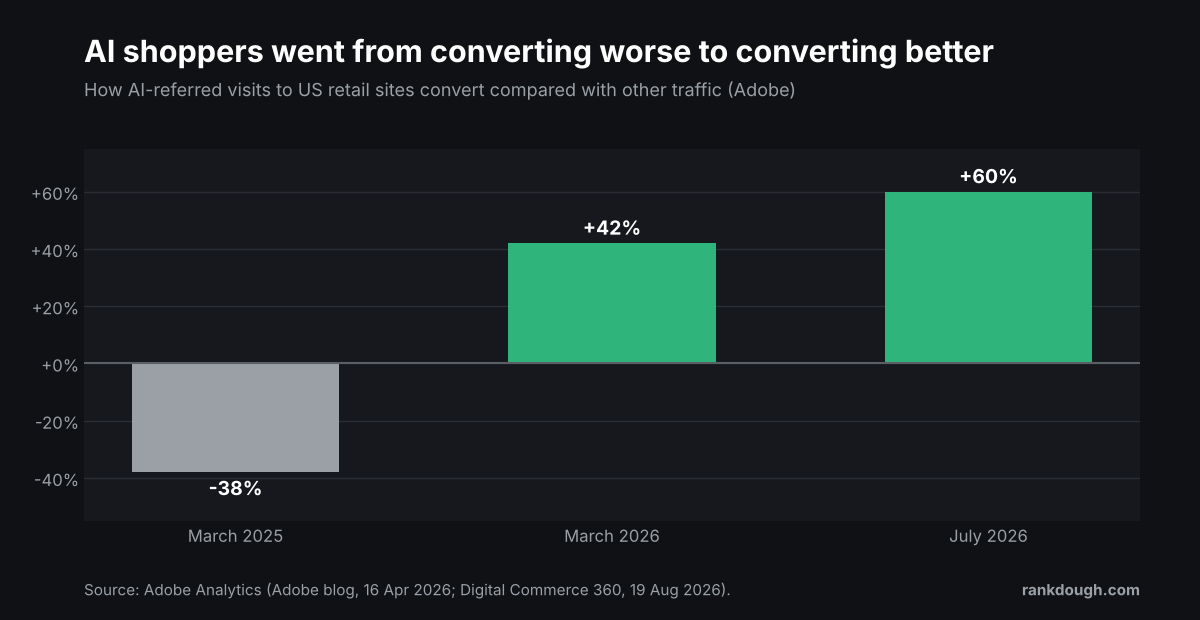
The money side is moving too. Adobe says AI-referred visits to US retail sites converted 38% worse than other traffic in March 2025. By March 2026 they converted 42% better, and by July 2026, 60% better.
Those are shoppers arriving from AI assistants, not agents buying on their own. It’s still the same shopper getting used to letting AI do the legwork, and the next step for that shopper is letting it send the enquiry too.
McKinsey’s forecast is the big number: up to $1 trillion in US retail revenue run through agents by 2030, and $3 trillion to $5 trillion worldwide. It’s a forecast, not a measurement, so I’d read it as a direction rather than a promise.
Sources: HUMAN Security, 2026 State of AI Traffic report (26 March 2026) and State of Agentic Traffic reports (May to October 2026); Adobe blog, 16 April 2026; Digital Commerce 360, 19 August 2026; McKinsey, The agentic commerce opportunity, 17 October 2025.
Who owns the agentic web on your team?
John Mueller at Google asked this on LinkedIn, and Joe Hall answered it in a longer piece. As I read his argument, SEOs shouldn’t own the agentic web. SEO owns whether an agent can find you and understand you. Developers own the parts where it acts: logins, payments, forms and APIs.
Our test fits that split almost exactly. Everything SEO touches worked: robots.txt, crawlable pages, prices in plain text, filters in the web address. Everything that belongs to the developer stopped the agent: the CAPTCHA, the room data behind the form and the six step application.
So I’d change the question. It isn’t who owns it, it’s who checks the hand over. Somebody has to run an agent from the first search to the submitted form, and right now that job sits between two teams and belongs to neither.
The developer side is where the new standards are landing. MCP lets an AI assistant connect to a business’s own tools. A2A lets agents talk to other agents. WebMCP, an early preview in Chrome and still a draft, lets a page tell an agent what a form does and which fields it needs, with a few attributes on the form rather than a rebuild.
In the comments under that debate, Natzir Turrado called this AX, agent experience, sitting next to UX. I like the name because it puts the form at the centre, not the ranking.
For a shop there are three more names to know. They all deal with the checkout, and none of them is a clear winner yet.
| Standard | What it does for your business | Who is behind it | My view for now |
|---|---|---|---|
| WebMCP | Tells an agent what your form does and which fields it needs | W3C group, with Google and Microsoft authors | Worth a small pilot on one form |
| UCP | Lets an agent find products and check out through one file on your site | Google, with Shopify, Etsy, Wayfair, Target and Walmart | Watch it if you sell on Shopify |
| ACP | Lets an agent complete a purchase and pass payment safely | Stripe, OpenAI and Meta | Watch it if you take payments with Stripe |
| AP2 | Records what the shopper allowed the agent to spend | Your payment provider’s job, not yours |
Sources: WebMCP repository; Google, Under the Hood: UCP, 11 Jan 2026; Stripe, Agentic Commerce Protocol; AP2 core concepts. All checked 3 Nov 2026. The views are mine, not tested.
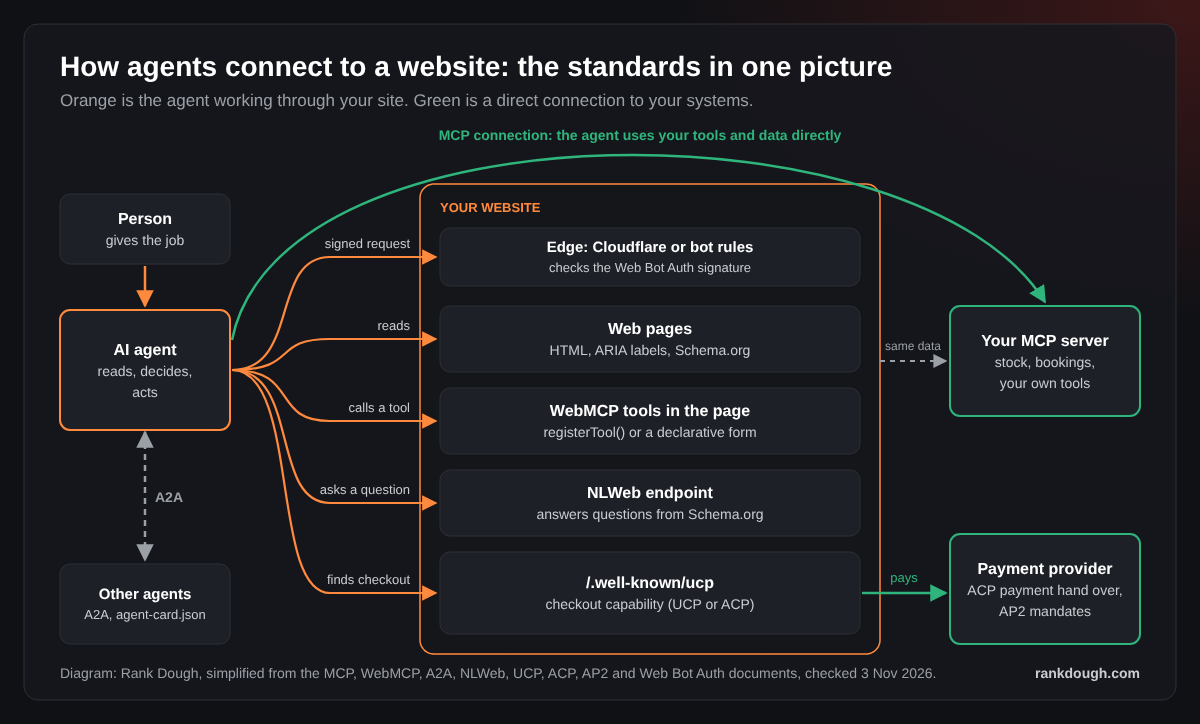
The order matters more than the standard. Fix the CAPTCHA, the labels and the data first. A new protocol on a form an agent can’t submit changes nothing.
Where is the web heading?
This is my reading, not a forecast. The web is turning into one page with two readers. People still read, compare and decide who to trust. Agents read the same page for facts they can act on: price, dates, room type and the next step.
The finding part looks a lot like SEO today. An agent finds you the way AI search finds you, through pages it can crawl and facts it can lift. That’s why I don’t see agents as a threat to SEO. They’re one more reader we have to write for.
The new part is the last mile. Up to now a website’s job ended when a person landed and filled in the form. With agents the form is the shop window and the till at once, and a tick box that costs you nothing with people can cost you every enquiry an agent tries to send.
The simple truth is that most sites will block agents by accident long before they decide to welcome them. The ones that check the hand over now will get the enquiries the others never see in their analytics.
What I’d do this month
- Check whether your site is on Cloudflare and screenshot the AI Crawler and Agent access policies page before changing anything.
- Allow Agent on the pages where people book, buy or enquire. Decide Training separately.
- Replace tick box CAPTCHAs on enquiry forms with an invisible check.
- Make the main filters work in the web address, and check the data on each form matches the page it came from.
- Run one agent from a real customer prompt to a submitted test form every quarter, and log where it stops.
Is Cloudflare blocking agents on your site?
Tick what’s true for your site. The answer tells you where to look first and links to the part of this post that explains it.
YOUR SITE
WHAT TO CHECK FIRST
The verdicts are Rank Dough’s reading of Cloudflare’s published defaults and our one test, not a measured model. Without JavaScript, the same checks are:
- Site on Cloudflare and domain added after 15 September 2026, with ads on key pages: Agent is likely blocked on those pages. Open the Agent setting.
- Site on Cloudflare and nobody knows who set the bot settings: screenshot the AI Crawler and Agent access policies page before changing anything. See where it is.
- Tick box CAPTCHA on the form: agents stop there even when Cloudflare lets them in. See what else stops agents.
- Site not on Cloudflare: this setting doesn’t apply, but the form still might block agents. Check the headers.
What doesn’t this post prove?
It’s one site, one agent and one day, 3 November 2026. A different agent, or the same agent on another day, may get stopped earlier or later.
The agent was Claude reading pages more than clicking them on the student site, so a browsing agent that clicks every button may stop earlier. On Currys we tested one product on one day and haven’t seen its Cloudflare settings, so we can’t say which rule blocked which run. The growth figures come from HUMAN Security’s and Adobe’s own customer data, not the whole web, and McKinsey’s 2030 figure is a forecast.
We haven’t seen that site’s Cloudflare dashboard yet. The agent got through, but we can’t tell you whether the Agent setting is on Allow or whether the site’s pages simply don’t count as ad pages. That’s the next thing we’re checking with the site’s developer.
We also haven’t rerun the test after the form fix. When we do, we’ll add the result here with the date.
Frequently asked questions about Cloudflare and AI agents
Does Cloudflare block AI agents by default?
For new domains added from 15 September 2026, yes, on pages that display ads. Agent and Training are blocked there by default and Search stays allowed. Cloudflare’s changelog applies that Agent default to new domains, so on an older domain check what is set rather than assume.
What counts as an AI agent in Cloudflare?
Cloudflare’s Agent group covers automated activity acting in real time for a person, such as chat fetch bots and browser agents driving Chrome. It’s separate from Search crawlers, which index pages, and Training crawlers, which collect content for models.
Where do I change the Agent setting?
In the Cloudflare dashboard, pick your domain, go to Security, then Settings, filter by Bot traffic and open AI Crawler and Agent access policies. Each group can be set to Block, Block on pages with ads, or Allow.
Is the setting available on the Free plan?
Yes. Cloudflare’s 1 July 2026 changelog says all customers, including those on the Free plan, can manage Search, Agent and Training separately.
If Cloudflare allows agents, can they fill in my forms?
Not always. In our 3 November 2026 test the agent got past Cloudflare on 3 of 3 prompts and past the enquiry form on 0 of 3, because every form used a reCAPTCHA v2 tick box. An invisible check such as reCAPTCHA v3 or Cloudflare Turnstile avoids the puzzle while still scoring spam.
Sources
- Rank Dough agent test log, student accommodation site on Cloudflare, three prompts, 3 November 2026
- Cloudflare changelog, New options to manage AI traffic, 1 July 2026: developers.cloudflare.com/changelog/post/2026-07-01-ai-traffic-options/
- HUMAN Security, State of Agentic Traffic, September 2026: humansecurity.com/learn/blog/september-2026-agentic-traffic-triples-meta-muse-debuts-at-no-1/
