
Claude can handle most of the hands-on work in SEO, from keyword research and content briefs to technical audits, publishing and Search Console analysis, once you connect it to your tools and give it written rules. Rank Dough tested every step of this guide on its own site between 5 and 9 October 2026, and took one new page from an 80-keyword research pull to a Google-indexed URL in a single day.
The guide covers which Claude features matter for SEO, how to set them up, how to use Claude for each SEO job, the prompts to start with, 12 hacks and the limits. Boxes marked “From our build” show what happened when we did it ourselves, with real screenshots.
TL;DR
Claude is most useful for SEO when it works from your real data (keyword tools, Search Console, your CMS) and within written rules (projects, skills and memory), not from general knowledge. Use it for research, briefs, drafting, audits, publishing drafts and data analysis, and keep keyword choice, final edits and the publish button with a person. Check the search results before trusting any difficulty score, scan your own site before planning, and fact-check every figure before it goes live.
How this was researched
The work behind the numbers, so you can judge them for yourself.
EFFORT
Five days, one live site
Each workflow in this guide was run on rankdough.com between 5 and 9 October 2026: 80 seed keywords researched, four pages built and published, a Search Console connector built, and 48 URLs scanned.
ORIGINALITY
Our own screenshots and data
The screenshots come from our own Ahrefs account, Search Console property, Claude chats and live pages. The impressions and crawl times are our own.
SKILL
Who ran it
Roman Sadowski, Co-Founder and SEO Lead at Rank Dough, chose the keywords, approved every publish and checked the live pages. Claude ran the tool calls, drafts and checks.
ACCURACY
What it does not prove
One site and four days of data on new pages. Nothing here shows Claude-built pages rank better or worse than hand-built ones. Claude features can change; check Anthropic’s help centre for the current set.
What can Claude do for SEO, and what can’t it do?
Claude can do the research, writing, analysis and repetitive build work in SEO. It reads data you give it or pulls through connectors, writes to rules you set, runs code to process files, and can publish drafts to a CMS through its API.
It can’t replace judgement. It doesn’t know your margins or which customers matter most, it can be confidently wrong about numbers it hasn’t checked, and without connectors it has no live data at all.
| SEO job | Good fit for Claude? | What stays with a person |
|---|---|---|
| Keyword research and clustering | Yes, with a keyword tool connected or an export uploaded | Which keywords the business should target |
| Content briefs and drafts | Yes, with house rules written as a skill | Final edit, facts, publishing |
| Content planning and cannibalisation checks | Yes, with access to your site | Priorities and budget |
| Technical audits | Yes, from crawl exports and live checks | Which fixes are worth the dev time |
| Publishing to a CMS | Yes, as drafts through the API | The publish decision |
| Search Console analysis | Yes, with a connector or exports | What the numbers mean for the business |
| Link building outreach | Drafts only | Relationships and sending |
Source: Rank Dough’s working view from client and in-house SEO work, October 2026.
What are the best Claude SEO hacks?
These 12 come from running the workflow, not from a list of tips. We scored each one on impact and on the effort to set it up; start with the bubbles in the top-left corner. Each hack is explained in context in the sections below.
- 1
Check the SERP before any difficulty score
Pull the top 10 with Domain Rating for every keyword before you commit, and compare the connector score with the app.
From our build: Our connector said KD 1, the Ahrefs app said 68, and the top 10 was DR 86 to 100.
- 2
Scan your own site before planning
Ask Claude to list every URL with its focus keyword and match it against the plan.
From our build: It turned one new post into "extend the existing post" and found two cannibalising pairs.
- 3
Add follow-up questions at zero volume
Add cost, time, minimum and comparison questions to every commercial cluster, even with no search volume.
From our build: In our ChatGPT tests the model added minimum order, turnaround and pricing to the buyer's question before it searched.
- 4
Pull People Also Ask into the FAQ
Ask Claude for the People Also Ask questions on the results page and use them as the first FAQs.
From our build: Four questions from the "ai seo agency" results became the start of our FAQ.
- 5
Clone a page that already works
Give Claude an existing page that converts and ask it to reuse the section structure.
From our build: Our new service page matched the site without a redesign.
- 6
Measure location pages for overlap
Ask Claude for the share of five-word phrases two pages have in common before publishing both.
From our build: Our UK page shares 8.0% with the Irish one, including the shared form and footer.
- 7
Keep menu links as drafts until the page is live
Add the menu item hidden, then switch it on after the page is published.
From our build: Our new menu link briefly pointed at a page visitors couldn't open.
- 8
Set SEO fields with a one-off snippet
When the CMS API won't save title or meta fields, write them with a single-use snippet and confirm the output.
From our build: Yoast titles saved through the API on our posts but not on our pages.
- 9
Inspect URLs in one sentence
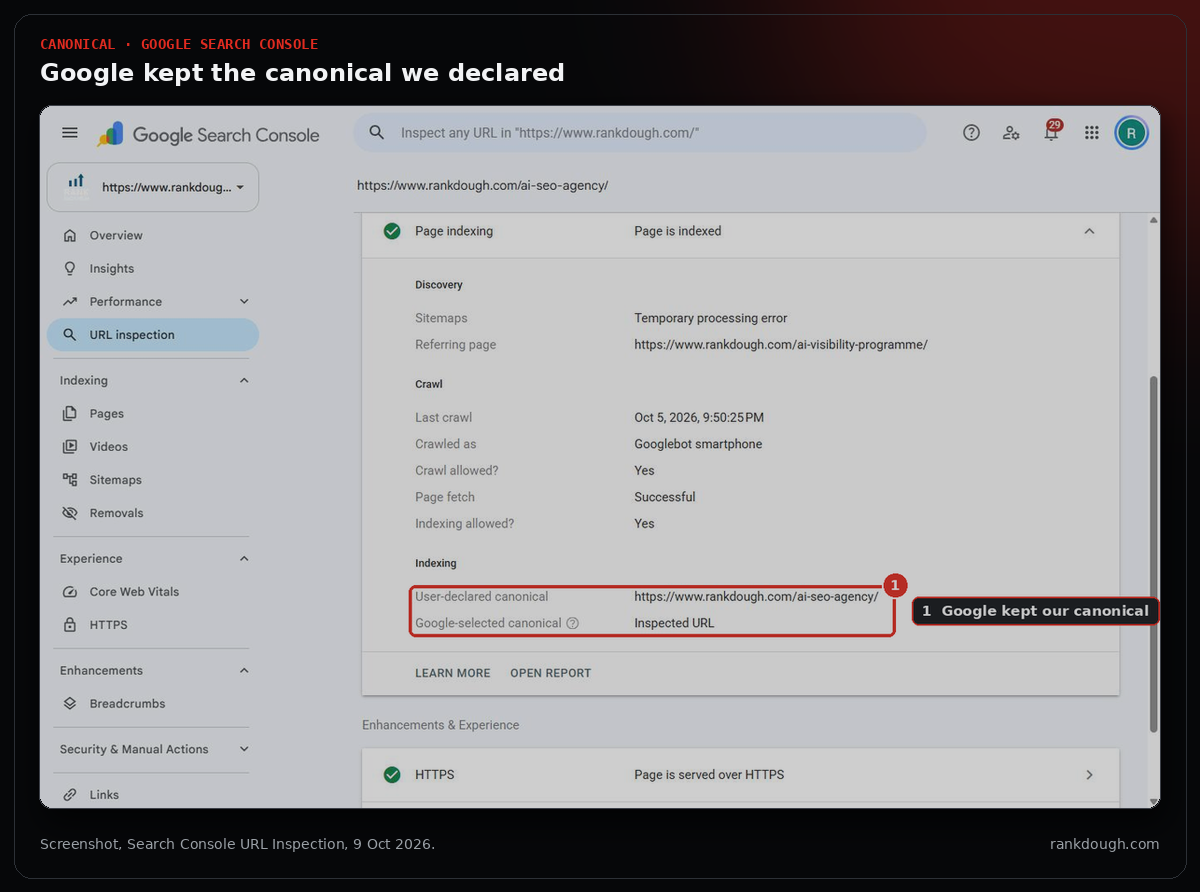
Connect Search Console and ask "is this URL indexed?" instead of opening the tool.
From our build: It returned verdict, crawl time and canonical for both new pages.
- 10
Compare periods by page
Ask for a page-level comparison of two date ranges after any launch or change.
From our build: One call gave the first four days for all 44 URLs with data.
- 11
Cluster middle-of-funnel queries
Filter queries with best, vs, review, compare or alternative and ask Claude to group them into topics with impressions and CTR.
From our build: Not part of this week's build; it is in our hacks bucket and works on any Search Console export.
- 12
Measure the live page, not the template
Use Claude's headless browser to measure what visitors see: font sizes, image weight, rendered content.
From our build: It caught 52px headings on our tools page against 40px elsewhere.
Impact (1 to 5) and effort (1 to 3) are Rank Dough’s own scores from running each hack, not measured outcomes. Bubble size grows with impact. Click a bubble or a row for the detail; use the chips to filter by stage.
Which Claude features matter for SEO?
Ten Claude features do the work in an SEO workflow. Each one replaces a step you would otherwise do by hand: exporting a file, opening a tab or re-explaining your brief.
| Feature | What it does for SEO | In our build (Oct 2026) |
|---|---|---|
| Connectors | Pull live data from tools such as Ahrefs into the chat | 80 seed keywords and 3 SERPs from Ahrefs |
| Custom connectors | Connect any tool with a remote MCP server, including ones you build | Our own Search Console connector, 8 tools |
| Projects | Keep each site’s brief, files and history together | One project per client |
| Skills | Load your written rules for a type of task | 5 skills: SEO method, blog style, audits, voice, editing |
| Memory | Carry preferences and decisions between chats | Page format and site set-up known on day one |
| File upload and code | Analyse CSV exports, run Python, call APIs | 4 pages published through the WordPress API |
| Artifacts | Build dashboards, reports and tools you can share | A plan dashboard, a site review, a Search Console dashboard |
| Web search and Research | Check SERPs, competitors and documentation | Google’s AI content guidance checked |
| Claude in Chrome | Work inside your logged-in browser | 5 screenshots from Ahrefs and Search Console |
| Claude Code | Run SEO scripts and crawlers in a terminal | Not used in this build |
Source: Claude features as used by Rank Dough, 5 to 9 October 2026. Custom connectors via remote MCP are available on Free, Pro, Max, Team and Enterprise plans, per Anthropic’s help centre.
How do you set up Claude for SEO?
Set up four things before your first SEO task: data, projects, rules and memory. It takes an afternoon, and every later task gets faster because you stop re-explaining.
- Connect your data. In Claude, go to Settings, Connectors, and add the tools you already pay for. A tool without an official connector can often be added as a custom connector by URL.
- Create one project per site. Put the brief, target markets, past audits and recent exports inside it, so answers come from that site’s context.
- Write your rules as skills. Page structure, tone, banned phrases, what needs a source, who approves a publish. A skill loads these rules every time the task comes up.
- Turn memory on and correct it. When Claude gets a preference wrong, say so once; it carries the correction into later chats.
FROM OUR BUILD
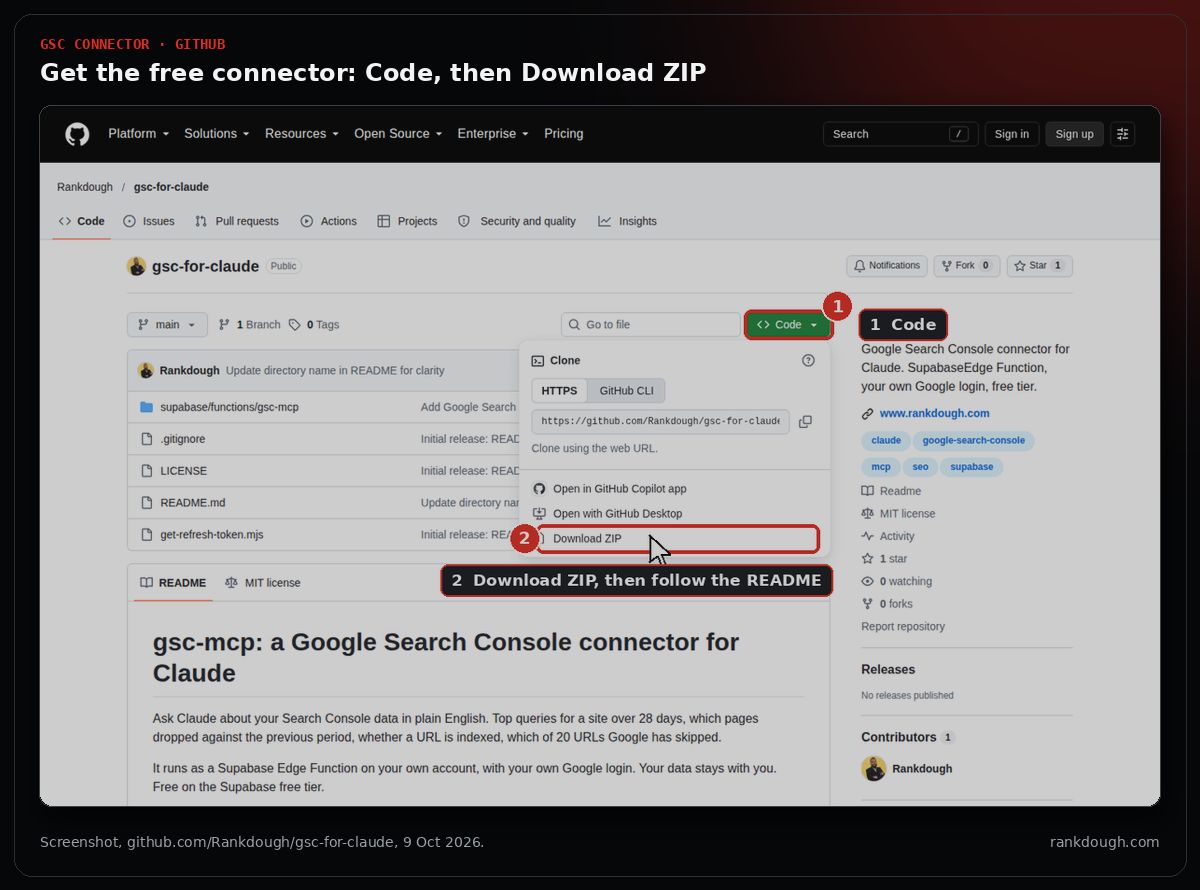
Our Search Console had no official connector in the Claude browser app on 8 October 2026, so we built one on a free Supabase account and added it as a custom connector. It gives Claude eight Search Console tools and we give it away free as the GSC Connector for Claude.
How do you do keyword research with Claude?
Use Claude to pull, sort and question keyword data, not to invent it. Without a connected tool or an uploaded export, its search volumes are guesses.
- Give Claude your seed topics: your services, what customers ask in emails and calls, and your own category language.
- Pull volume, difficulty and the top 10 for each seed through a connector, or upload an export from your keyword tool.
- Ask Claude to group the keywords by search intent and map each group to one existing or new page.
- Check the search results for every keyword you plan to target before you commit.
- Add the follow-up questions each keyword leads to (cost, time, minimums, comparisons), even at zero volume, because buyers and AI tools ask them next.
PROMPT TO TRY
Pull US volume, keyword difficulty and the top 10 results with Domain Rating for these keywords. Group them by search intent, map each group to one page on our site, and flag any keyword where the top 10 is all DR 80 or higher.
FROM OUR BUILD
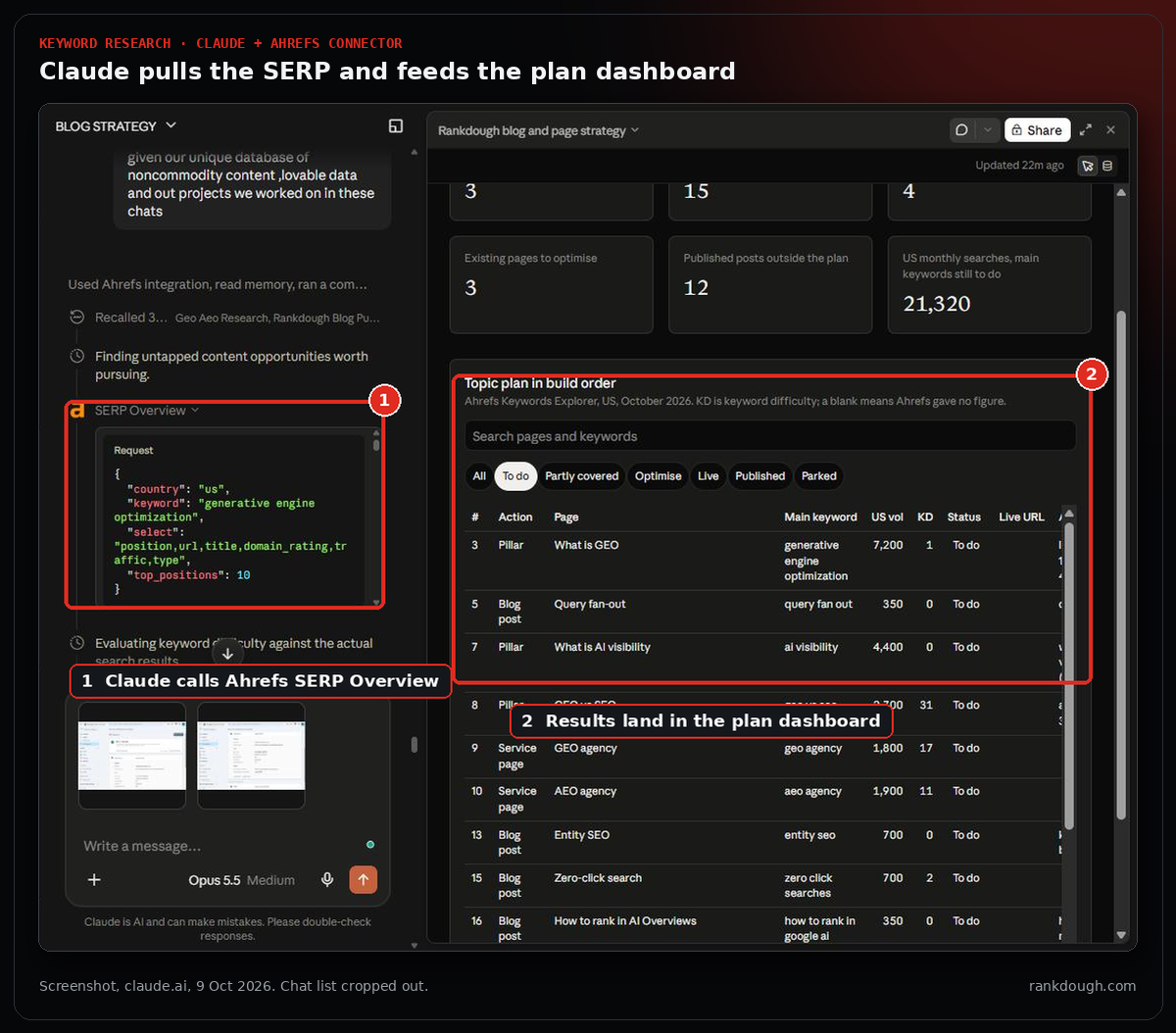
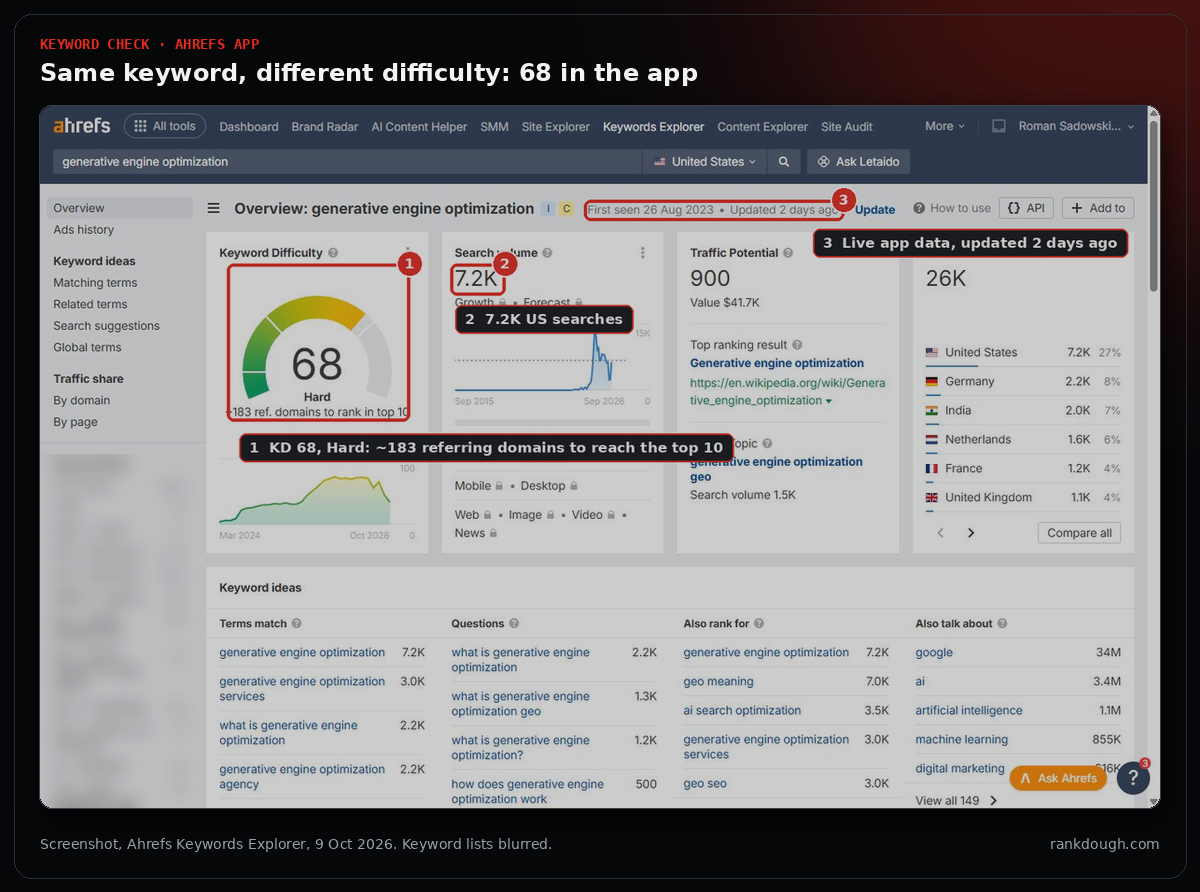
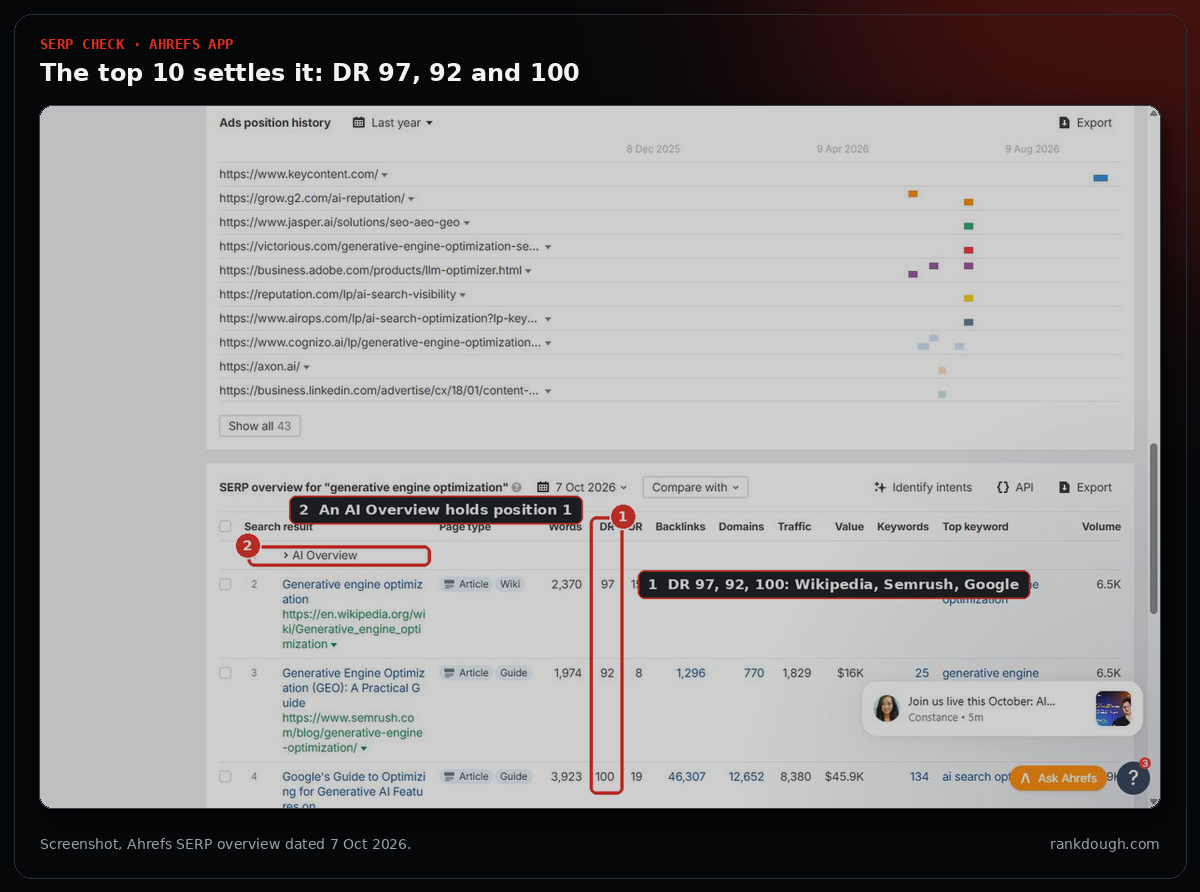
Claude ran two Ahrefs overview calls covering 80 seed keywords and grouped them into a 24-row build order. “Generative engine optimization” came back from the connector on 5 October with 7,200 US searches and a difficulty of 1. The Ahrefs app showed 68, Hard, on 9 October, and the top 10 was Wikipedia, Semrush and Google at DR 92 to 100. The SERP was the tiebreaker, and we parked the keyword.
| Keyword | US searches / month | Keyword difficulty (connector) | Who holds the top 10 | Decision |
|---|---|---|---|---|
| generative engine optimization | 7,200 | 1 (68 in the app on 9 Oct) | Wikipedia, Google, Semrush, Coursera, Moz (DR 86 to 100) | Parked |
| ai seo agency | 3,800 | 12 | Agency service pages (DR 65 to 80) and listicles (DR 42 to 60) | Built 5 Oct |
| claude seo | 400 | 11 | A GitHub repo, Reddit threads and small tool sites from DR 3 | This guide |
| mcp seo | 200 | 4 | Not checked | Secondary keyword here |
Source: Ahrefs Keywords Explorer and SERP Overview through the Ahrefs connector, United States, pulled 5 and 9 October 2026. Keyword difficulty is the figure the connector returned; the Ahrefs app can show a different, newer figure.
How do you write content briefs and articles with Claude?
Let Claude assemble the brief and the first draft, and keep the facts and the final edit with a person. A good brief from Claude lists the target keyword, the questions the page must answer, what the current top results cover and what your page can add that they don’t.
- Pull the People Also Ask questions and the headings of the top results for the keyword.
- List the facts only you have: your prices, your data, your results, your process. These are what make the page worth citing.
- Draft against your skill rules: answer first, one idea per paragraph, every heading a question.
- Fact-check every number against its source, including titles, meta descriptions, image alt text and FAQ answers.
PROMPT TO TRY
Write a brief for “[keyword]”: the questions from People Also Ask, what the top 5 results cover, three gaps none of them fill, and the first-party facts we should add from the attached export. Do not write the article yet.
FROM OUR BUILD
This guide was drafted by Claude under our blog rules, then checked line by line. The check caught a chart subtitle that said “0 clicks for all eight” pages when one page had one click, and a claim about client work that our records didn’t support. Both were fixed before upload.
How do you plan content and avoid cannibalisation with Claude?
Ask Claude to scan your own site before it plans anything new. A plan built without knowing what already exists will happily commission pages you already have.
PROMPT TO TRY
List every published page and post on our site with its focus keyword. Match them against this plan, mark what is already covered, and flag any focus keyword used by more than one URL.
FROM OUR BUILD
Claude read all 48 URLs on rankdough.com through the WordPress API and matched them against our plan. Five planned items were already live or partly covered, and two pairs of our own posts shared a focus keyword without us noticing.
| What the site scan found | Count |
|---|---|
| Pages and posts scanned | 48 |
| Plan items already live | 1 |
| Plan items partly covered by a live post | 4 |
| Existing pages to optimise, not rebuild | 3 |
| Posts sharing a focus keyword with another post | 4 (2 pairs) |
| Published posts outside the plan | 12 |
Source: WordPress REST API scan of rankdough.com (29 pages, 19 posts) and Yoast focus keywords, 9 October 2026.
Keep the plan in an artifact rather than a chat message. Claude can build a sortable dashboard where every row shows its keyword, volume, status and live URL, and you can update it as pages go live.
How do you build and publish pages with Claude?
Let Claude build and publish drafts through your CMS’s API, and keep the publish decision with a person. On WordPress, an Application Password lets Claude create drafts, set categories and upload images without your main login.
- Copy the structure of a page that already works on your site, so the new page matches without a redesign.
- Open with the keyword in the H1 and one fact sentence: who you are, where, and what you do.
- Create it as a draft, read the preview, then publish.
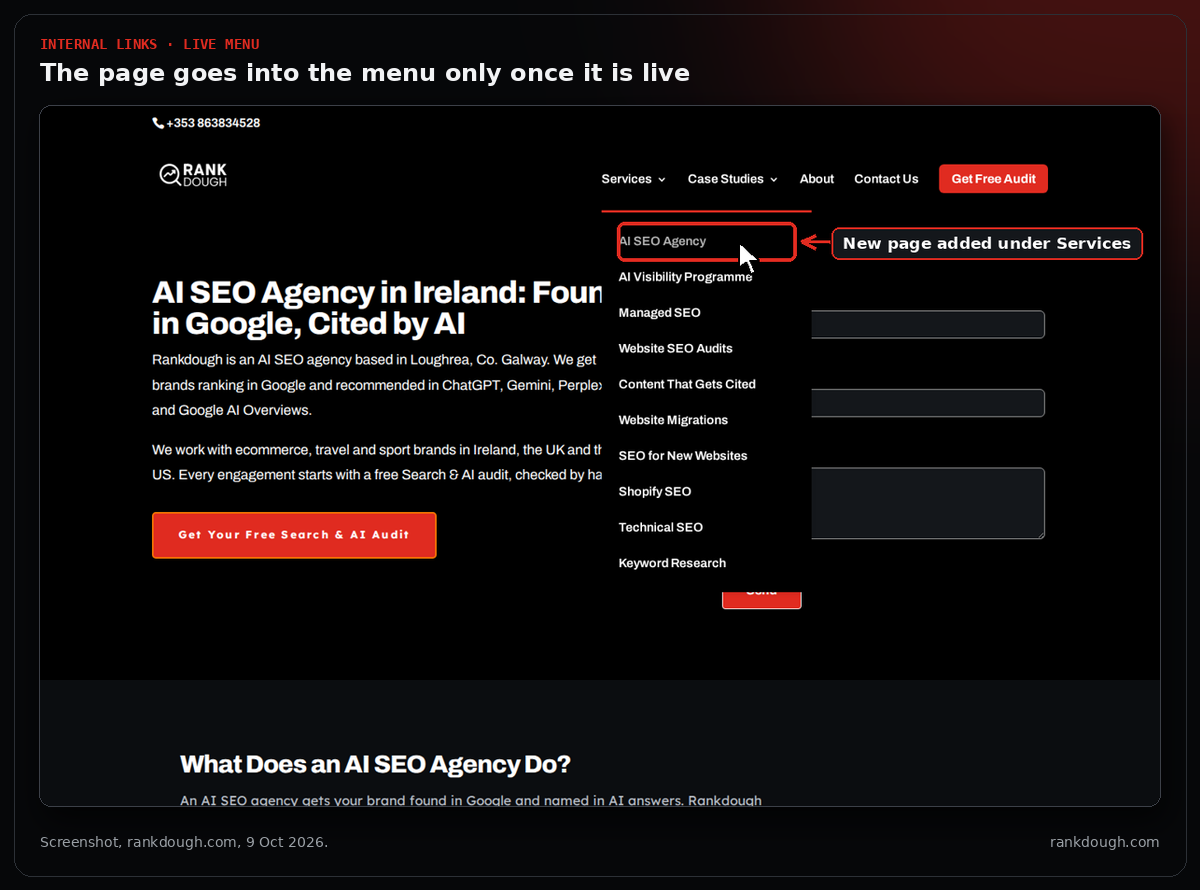
- Add internal links from the menu and related pages only once the page is live.
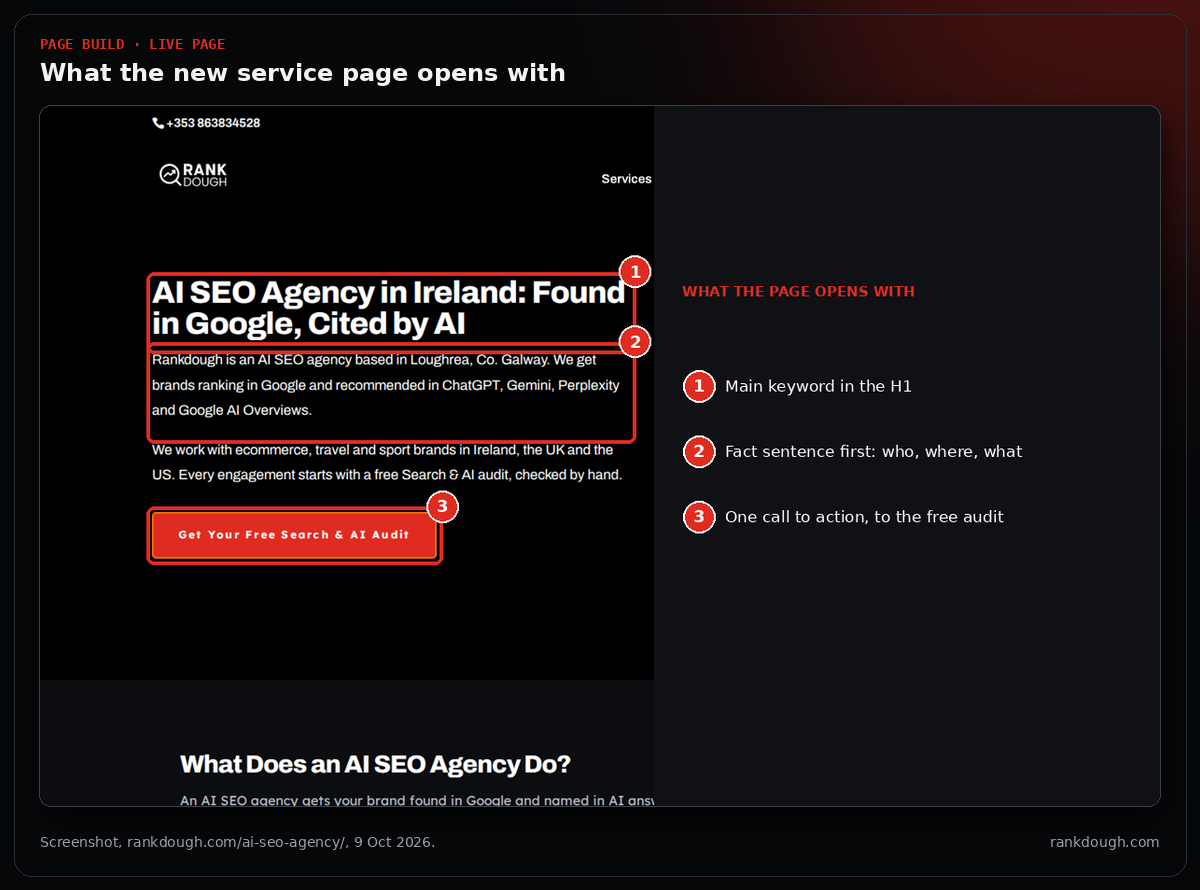
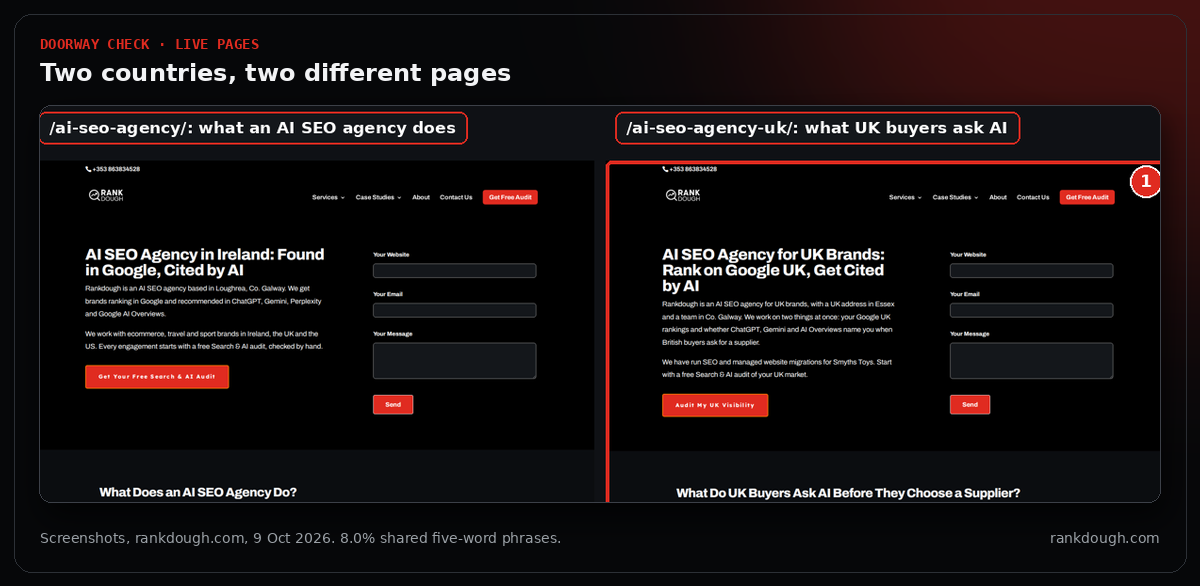
Location pages need care. Two near-identical pages for two countries is a doorway page, so each version needs facts that only apply to that market.
FROM OUR BUILD
Our UK page was written around UK prices, delivery, returns, British spelling and a UK address. Claude measured the overlap with the Irish page: 8.0% of the UK page’s five-word phrases also appear on the Irish one, including the shared form and footer.
How do you run technical SEO and UX audits with Claude?
Give Claude the crawl data and let it do the sorting and joining. Upload your crawler exports and it can list non-indexable URLs, missing or duplicate titles, redirect chains and orphan pages, then join each issue to its Search Console clicks so you fix what has traffic first.
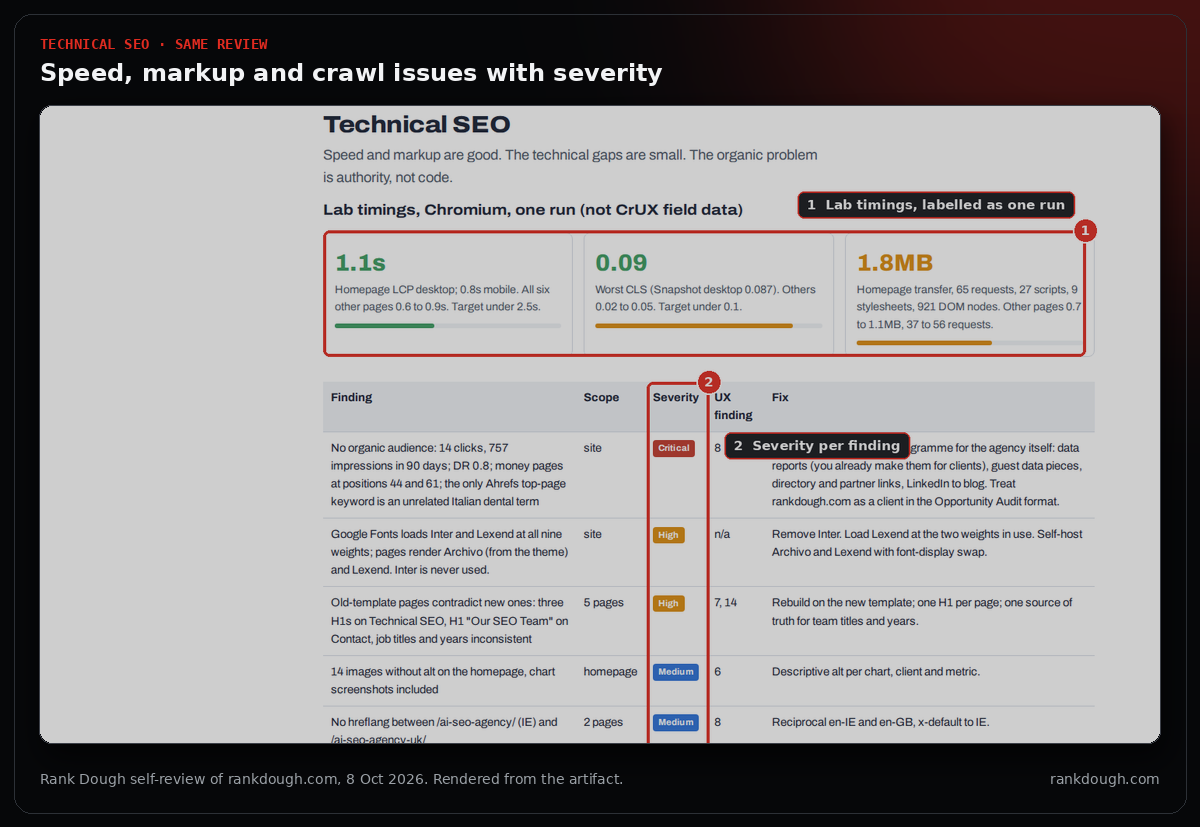
Claude can also check the live site. In its own sandbox it can run a headless browser that opens public pages, takes screenshots and measures what actually renders, such as font sizes, image weights and whether content needs JavaScript to appear.
PROMPT TO TRY
Here are our crawl exports and a Search Console page export. List every issue that blocks crawling or indexing, join each to its clicks over the last 3 months, and sort by clicks. Mark each finding as observed, tool data or hypothesis.
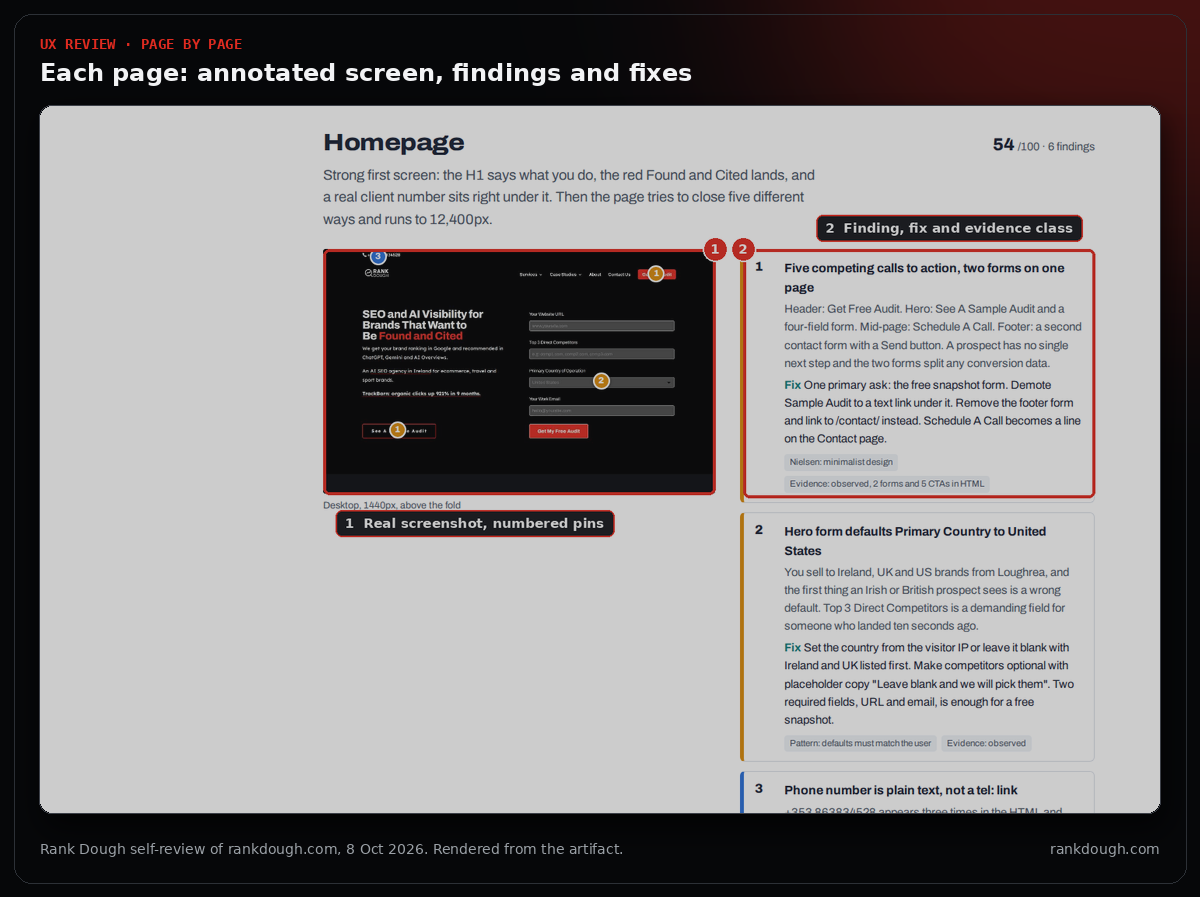
For a UX review, ask Claude to walk the site like a buyer, page by page, on desktop and at phone width. The question for each page is whether a prospect understands the offer, trusts it and knows what to do next.
Ask for the output as a report you can reopen and share: a verdict and score first, then an annotated screenshot per page, each finding with its fix and an evidence label, and the fixes in order.
PROMPT TO TRY
Review [site] as a first-time buyer on desktop and at 390px. For each page give a score, an annotated screenshot with numbered findings, the fix for each finding, and whether it is observed, tool data or a hypothesis. Start with a one-line verdict and end with a fix order.
FROM OUR BUILD
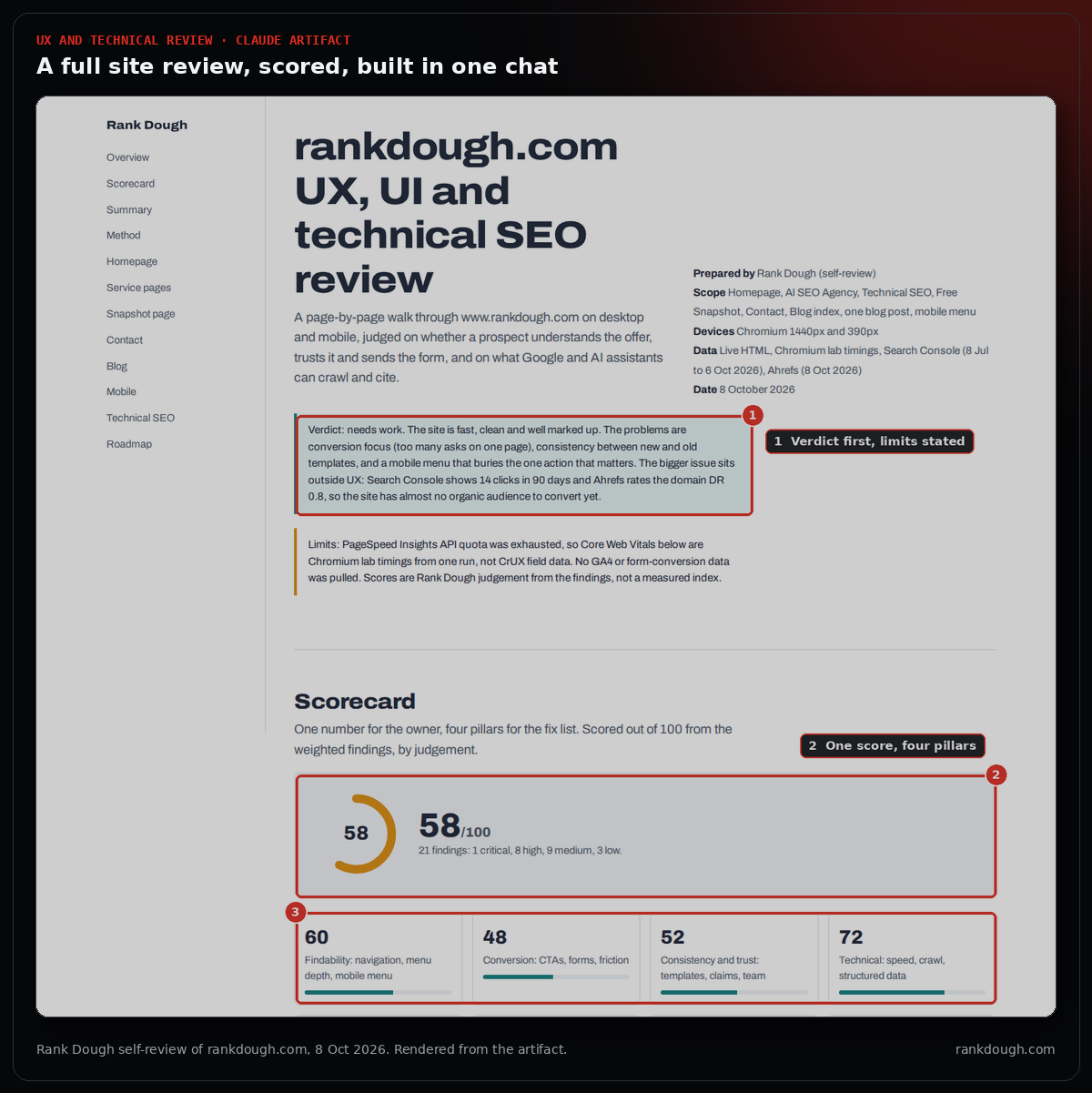
On 8 October Claude reviewed rankdough.com this way and built the report as an artifact: 21 findings across the homepage, service pages, snapshot page, contact, blog and mobile, scored 58 out of 100, with 1 critical, 8 high, 9 medium and 3 low. The critical finding wasn’t code: the site has almost no organic audience yet.
FROM OUR BUILD
We run the same technical and UX audit on client sites, and we are turning it into an audit agent: a headless browser that walks the menu, page templates, site search and mobile view and saves the evidence, with Claude judging the screenshots against a written rubric. We tested it in October 2026 on two Shopify retailers and our own WordPress site.
FROM OUR BUILD
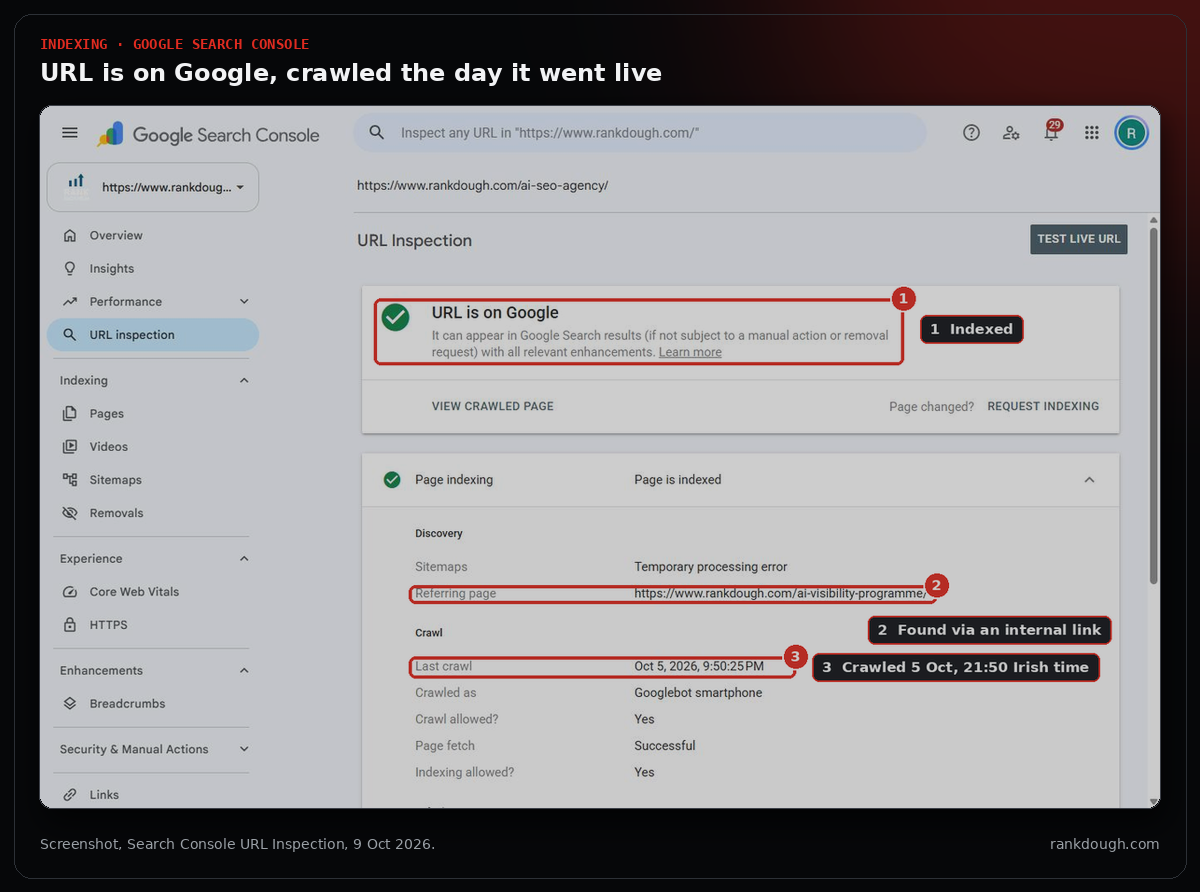
A headless browser check showed our new tools page used 52px headings against 40px on the rest of the site. Search Console also showed a “temporary processing error” on our sitemap, while Google still found the new page through an internal link.
How do you analyse Search Console data with Claude?
Connect Search Console, or upload exports, and ask questions in plain English. With a connector, “is this URL indexed?” and “what dropped against last month?” each take one sentence.
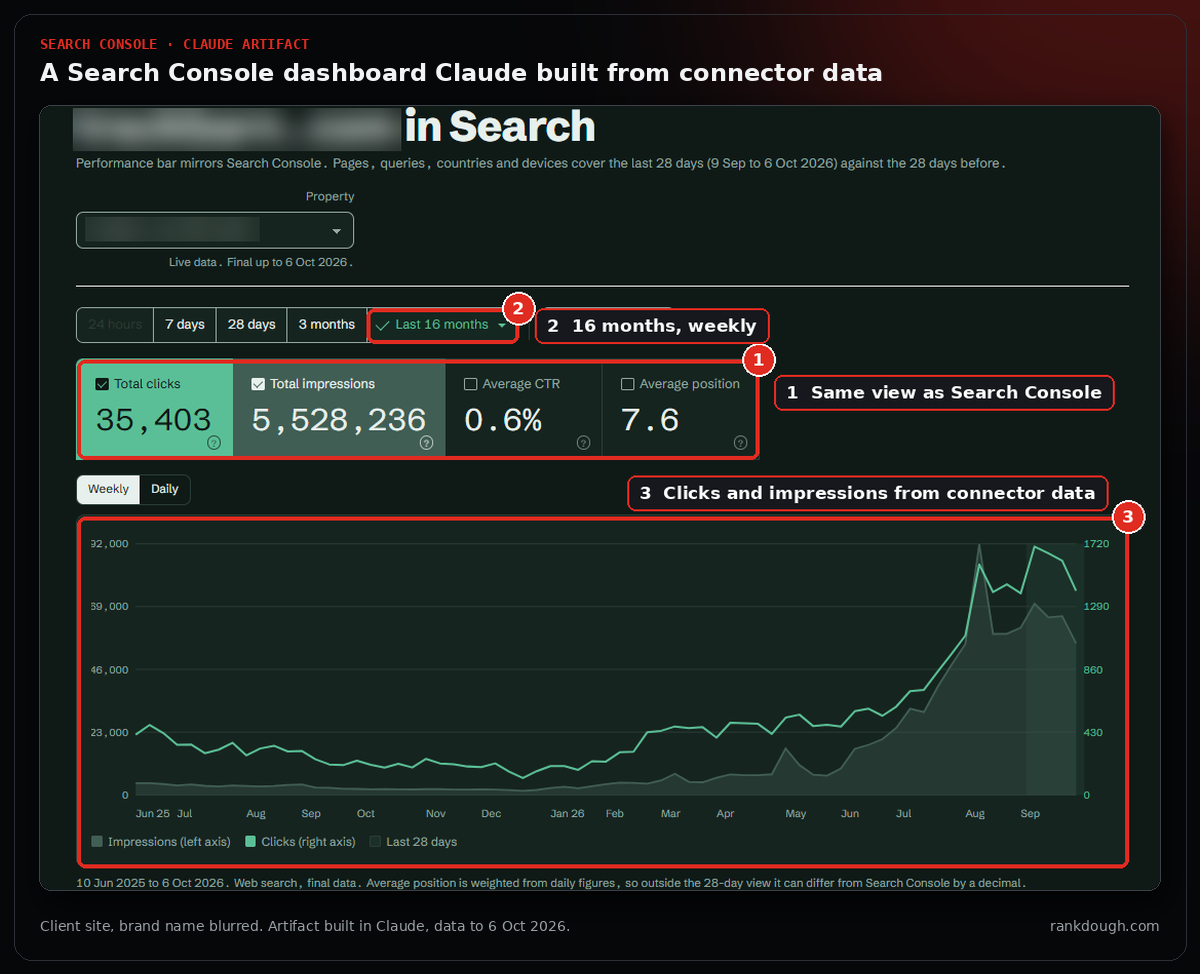
Then ask Claude to turn the data into a dashboard you can reopen. The one below mirrors the Search Console performance view for a client’s site: 16 months of weekly clicks and impressions, built in one chat from connector data.
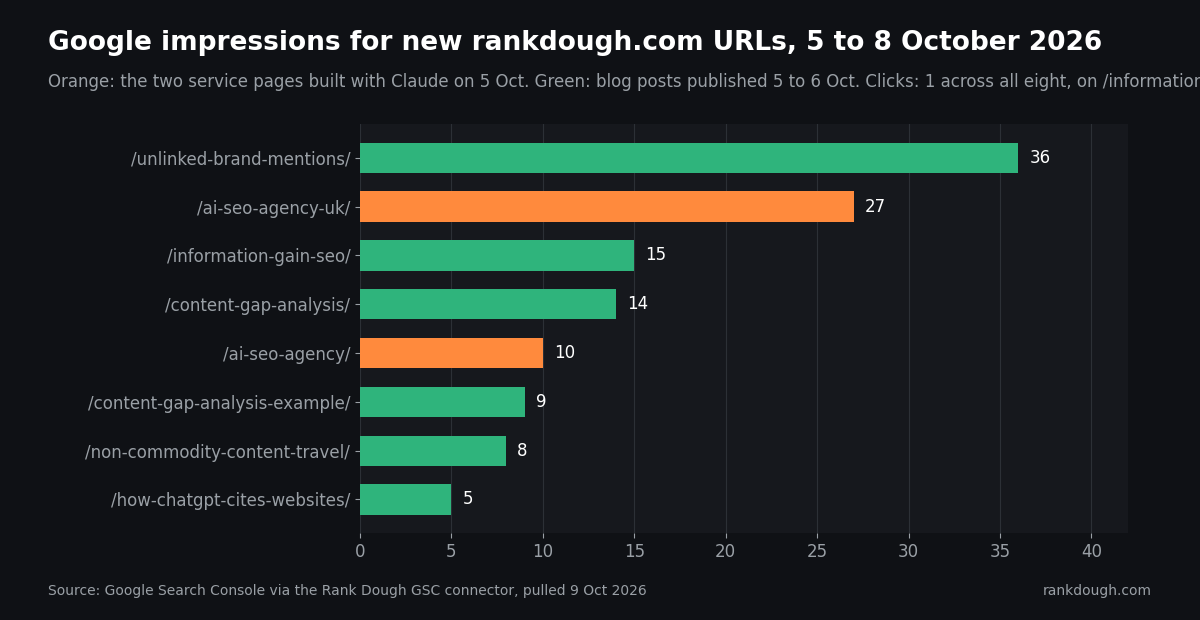
Compare periods by page to see every new or changed URL at once. Pages with high impressions and a weak click-through rate usually need a title that matches the query better.
FROM OUR BUILD
One period comparison through our connector gave the first four days for every URL on the site. The new service pages sit on pages four to seven of Google, while blog posts published the same day already show higher positions.
| Page (published 5 Oct) | Impressions, 5 to 8 Oct | Average position | Clicks |
|---|---|---|---|
| /ai-seo-agency-uk/ | 27 | 61.0 | 0 |
| /ai-seo-agency/ | 10 | 43.7 | 0 |
| /information-gain-seo/ (blog post) | 15 | 23.9 | 1 |
| /content-gap-analysis/ (blog post) | 14 | 36.7 | 0 |
Source: Google Search Console, rankdough.com property, pulled through the Rank Dough GSC connector on 9 October 2026. Performance data lags about three days.
HACK Cluster your middle-of-funnel queries. Filter Search Console queries with the regex .*(best|vs|review|compare|alternative).* over the last three to six months, then ask Claude to group similar queries into topics with total impressions, clicks, CTR and average position. High impressions with a weak CTR point to a title that misses the comparison intent; a topic with no strong page is a new page to write.
How do you write titles, meta descriptions and schema with Claude?
Ask for options with limits stated: titles under 60 characters with the keyword near the front, meta descriptions under 155 characters with a number or a reason to click. Then generate FAQ schema from the exact text of the FAQ on the page, so the two never disagree.
Check every one by hand before publishing. Google judges the page, not the tool, and a wrong figure in a meta description is still a wrong figure.
FROM OUR BUILD
On our WordPress set-up, Yoast titles and descriptions saved through the API on posts but not on pages. Claude set the page fields with a one-off snippet in the Code Snippets plugin instead, then confirmed them in the page’s Yoast output.
How do you run an AI visibility audit with Claude?
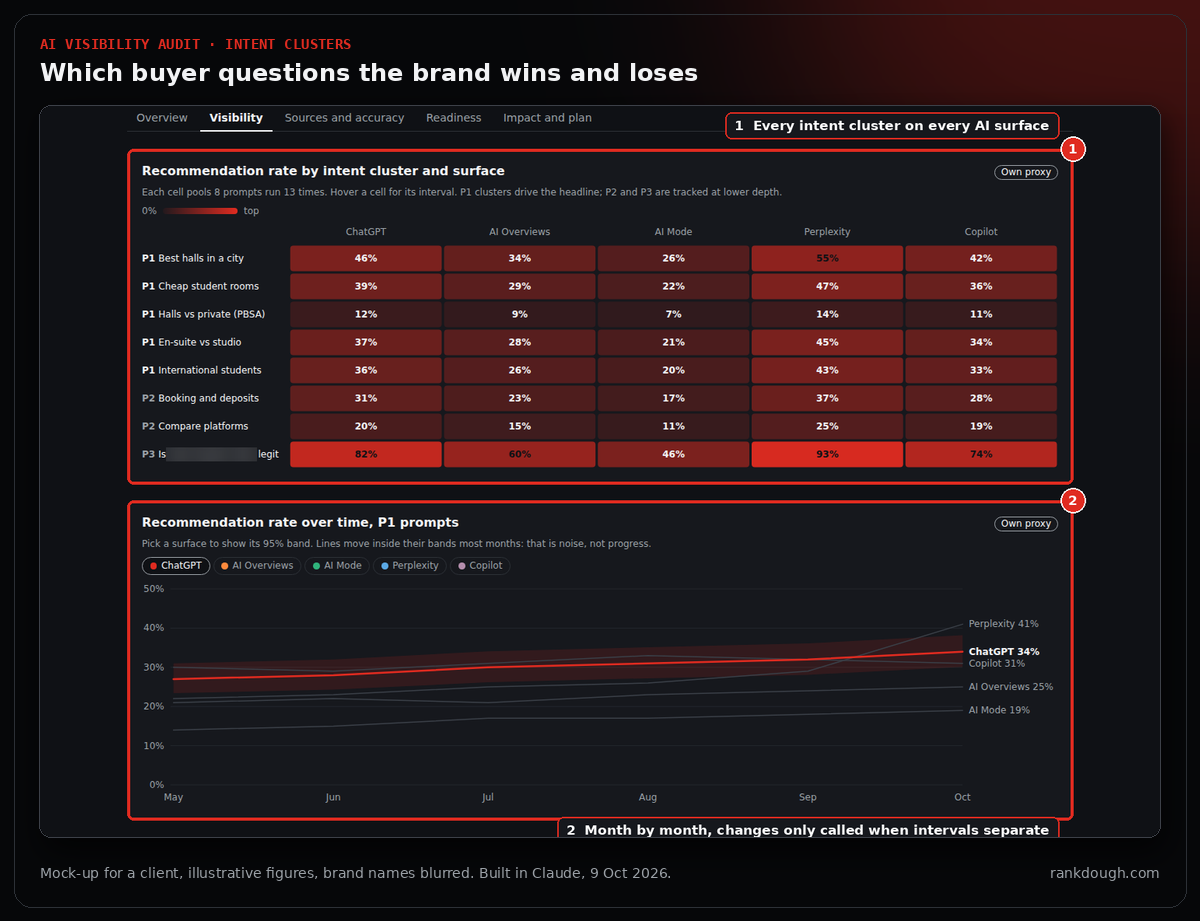
Treat AI answers as a channel you sample, not a ranking you read. In SparkToro’s study of 2,961 runs across ChatGPT, Claude and Google’s AI, the chance of getting the same brand list twice was under 1 in 100, and the same list in the same order about 1 in 1,000. What holds steady is the share of answers that mention a brand.
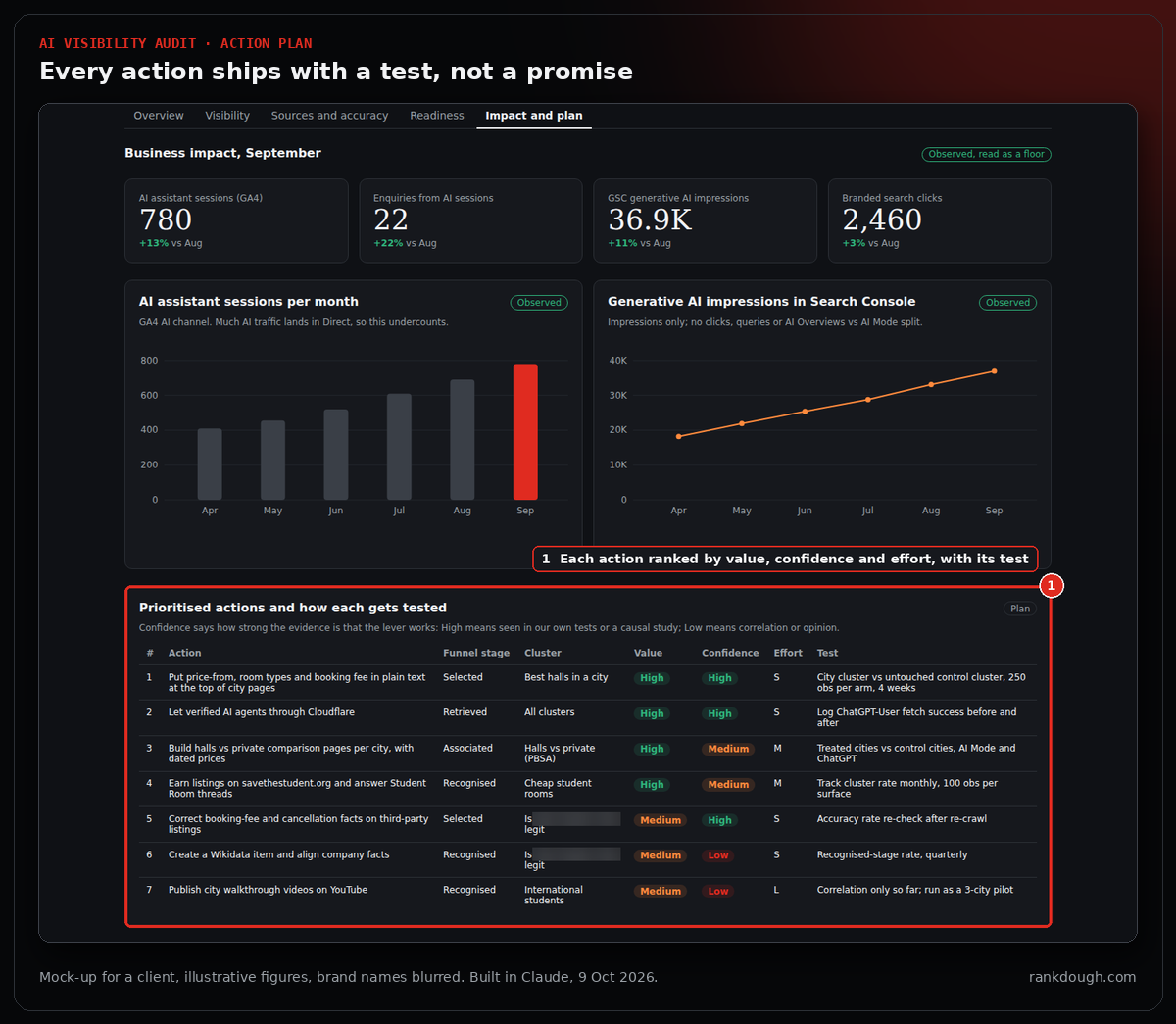
So Rank Dough built its AI audit around visibility as a rate. Claude researched how practitioners and tracking tools run these audits, checked the evidence on sample sizes, and turned it into a five-phase process: scope, prompt library, baseline sampling, diagnosis, and an action plan where every fix ships with a test.
- Build a prompt library. 8 to 12 intent clusters with 5 to 8 phrasings each, tagged by funnel stage, market and branded or non-branded.
- Sample each cluster on each AI surface about 100 times. Standard binomial maths puts that at about ±10 points at 95% confidence. Spread runs over several days, logged out, from the target country.
- Report each surface and market separately. Show the rate, the run count and the interval. Never a rank position and never one blended score.
- Diagnose where the brand drops. Recognised by the model, matched to the buyer’s question, retrieved as a source, and finally selected.
- Tag every number. Observed, own sample, third-party estimate or modelled, so the client knows what to trust.
- Pair each action with a test. Control clusters, sample size and a readout date, before anyone claims a result.
PROMPT TO TRY
Design an AI visibility audit for [brand] in [market]: 8 intent clusters with 6 prompts each, the AI surfaces to sample, the runs per cluster for plus or minus 10 points, and a dashboard layout. Report rates with intervals, never rank positions.
FROM OUR BUILD
Claude designed the audit dashboard as an artifact for a client in the student accommodation market, with illustrative figures until the first sampling run. It shows the recommendation rate per AI surface with intervals, where ChatGPT drops the brand, who gets recommended instead, results by intent cluster and surface, and a test for every action. Brand names are blurred in the screenshots.
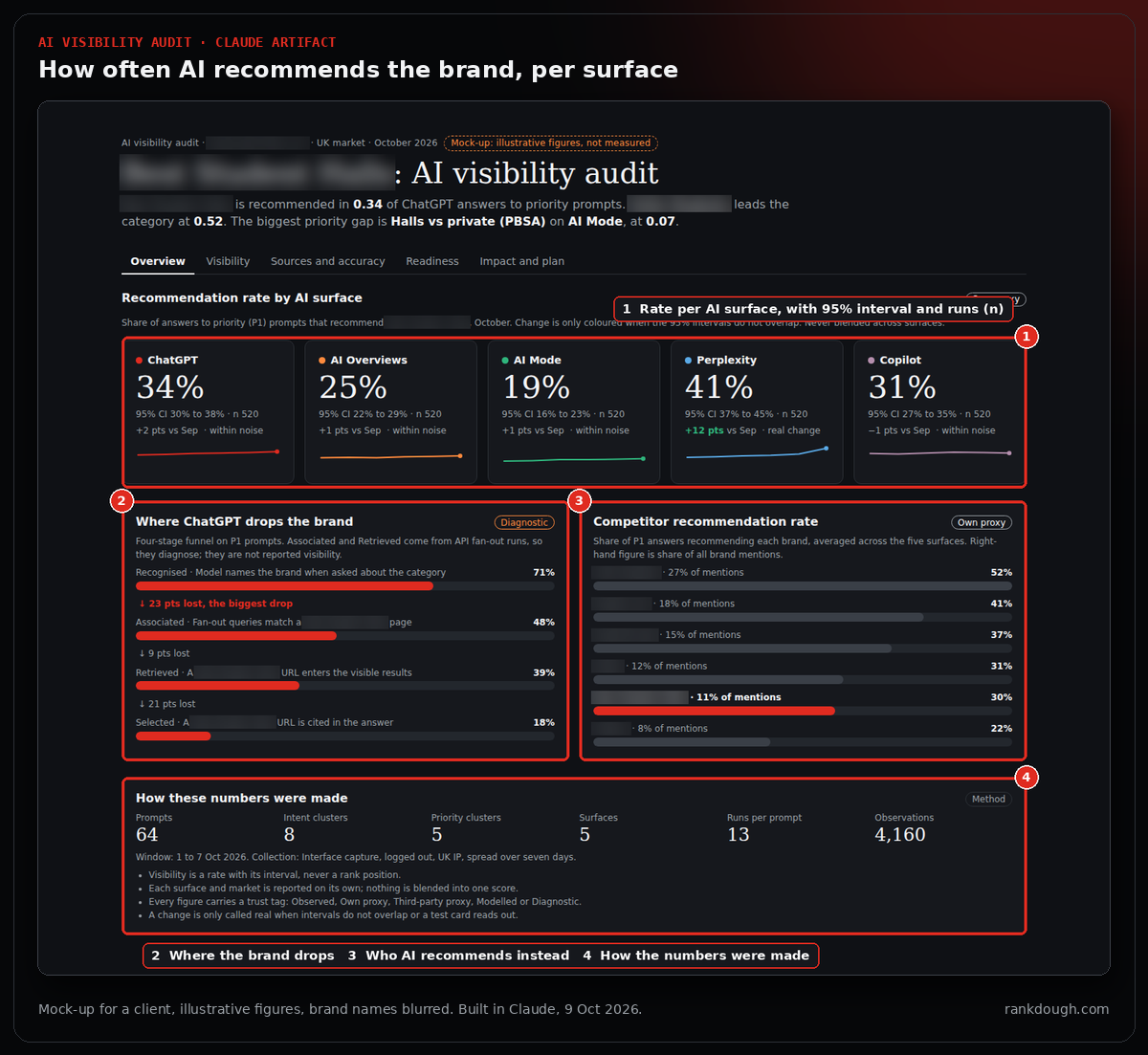
Our own ChatGPT tests found that ranking first in Google did not mean being cited, and that the pages it cited stated prices, minimums and turnaround in plain sentences. The full method and results are in How ChatGPT chooses which websites to cite.
How do you get screenshots and visuals for SEO content with Claude?
Use real, annotated screenshots for how-to content, so readers can follow the steps. Claude’s headless browser can capture public pages, and Claude in Chrome can capture tools behind your login, such as Ahrefs and Search Console.
Headless browsers stop at bot checks: Google returned a reCAPTCHA and the Ahrefs checker a “verify you are human” screen in our tests. Then run a privacy pass on every capture before it goes public.
HACK Crop chat lists, blur saved keyword lists and client domains, and delete any unmasked original from your server so its URL returns a 404. Every screenshot in this guide went through that pass.
What are the limits of Claude for SEO?
- Data is only as good as the source. Our Ahrefs connector and the Ahrefs app gave different difficulty scores for the same keyword.
- It can be confidently wrong. A chart and a claim in this guide’s first draft were both wrong until the fact check.
- Logins and bot checks stop it. Headless browsers can’t pass reCAPTCHA or reach logged-in tools; use Claude in Chrome or your own exports.
- It makes changes fast, including wrong ones. A menu link to an unpublished page went live briefly before Claude caught it on the live site.
- It has no business context unless you give it. Margins, priorities and which customers matter stay with you.
Every limit has the same fix: a person reads the live preview before anything is published, and every number names where and when it was pulled.
What should you set up first?
Start with data, then rules. Connect your keyword tool and Search Console, create a project for your site, and write your page and content rules as a skill.
Then run one small job end to end, such as a single page from keyword to indexed URL, and fix the process before you scale it. Rank Dough runs every workflow on its own site first, and I’ll update this guide with the three-month Search Console numbers for the pages built here.
FAQ
Can Claude do SEO?
Claude can do much of the hands-on SEO work once it is connected to your tools: keyword research, briefs, drafts, technical audits from crawl exports, publishing drafts through a CMS API and Search Console analysis. Choosing what to rank for and approving each publish should stay with a person.
How do you connect Claude to Google Search Console?
There was no official Google connector in the Claude browser app when we checked in October 2026. Third-party ones exist, or you can build your own: ours is free, runs on your own Supabase account and is added in Claude under Settings, Connectors, as a custom connector.
Can Claude connect to Ahrefs?
Yes, through the Ahrefs connector. We used it for search volume, keyword difficulty and top-10 results. For one keyword the connector returned a difficulty of 1 while the Ahrefs app showed 68, so check the search results before trusting a single score.
How do you use Claude skills for SEO?
A skill is a written set of rules Claude loads for a type of task. Use them for your SEO method, content style, audit checklist and tone of voice, so every output follows the same rules without re-briefing.
Does Google penalise content written with Claude?
Google says using AI gives content no special gains, and that using automation mainly to manipulate rankings breaks its spam policies. It judges the page, not the tool, so read and fact-check everything before it goes live.
Sources
- Rank Dough build record: Ahrefs pulls, WordPress build and Search Console data for rankdough.com, 5 to 9 October 2026
- SparkToro, New research: AIs are highly inconsistent when recommending brands or products, January 2026: sparktoro.com
- Google Search Central, Google Search’s guidance about AI-generated content: developers.google.com
