
Rank Dough builds high intent landing pages in 8 steps: find the decision behind the search, collect evidence for it, turn each decision into a page component, then use AI to build the page and check it. For a UK student accommodation marketplace we mapped 26,716 keywords and ideas before AI wrote a line, and turned the London searches into the buying decisions the page now answers.
This guide walks through each step with the prompts we used, 16 figures from the real build, and the mistakes we made on the way.
TL;DR
A high intent landing page should answer the decision behind a search, not repeat the keyword. Map your searches to decisions such as budget, location, room and contract, give each decision a component backed by real data, then brief AI in three checked passes. Lay the page out in the order people decide, keep key facts in plain text, and test whether a stranger can complete the task before you call it done.
How this was researched
The work behind the numbers, so you can judge them for yourself.
EFFORT
A UK map and a working prototype
26,716 keywords and ideas organised from Ahrefs and Search Console, then a London page prototype with 12 properties built and revised over several rounds in October and November 2026.
ORIGINALITY
Our own data and screenshots
The keyword map, the cost planner, the room examples and every screenshot come from our own build. Outside research is linked under each figure.
SKILL
Who ran it
Roman Sadowski, Co-Founder and SEO Lead at Rank Dough, ran the keyword research, set the page decisions and reviewed each version. AI tools did the drafting and building.
ACCURACY
What it does not prove
The page is a prototype. No rankings, bookings or AI citations were measured. Volumes are Ahrefs estimates that overlap, and the room examples are historical.
What problem does a high intent landing page need to solve?
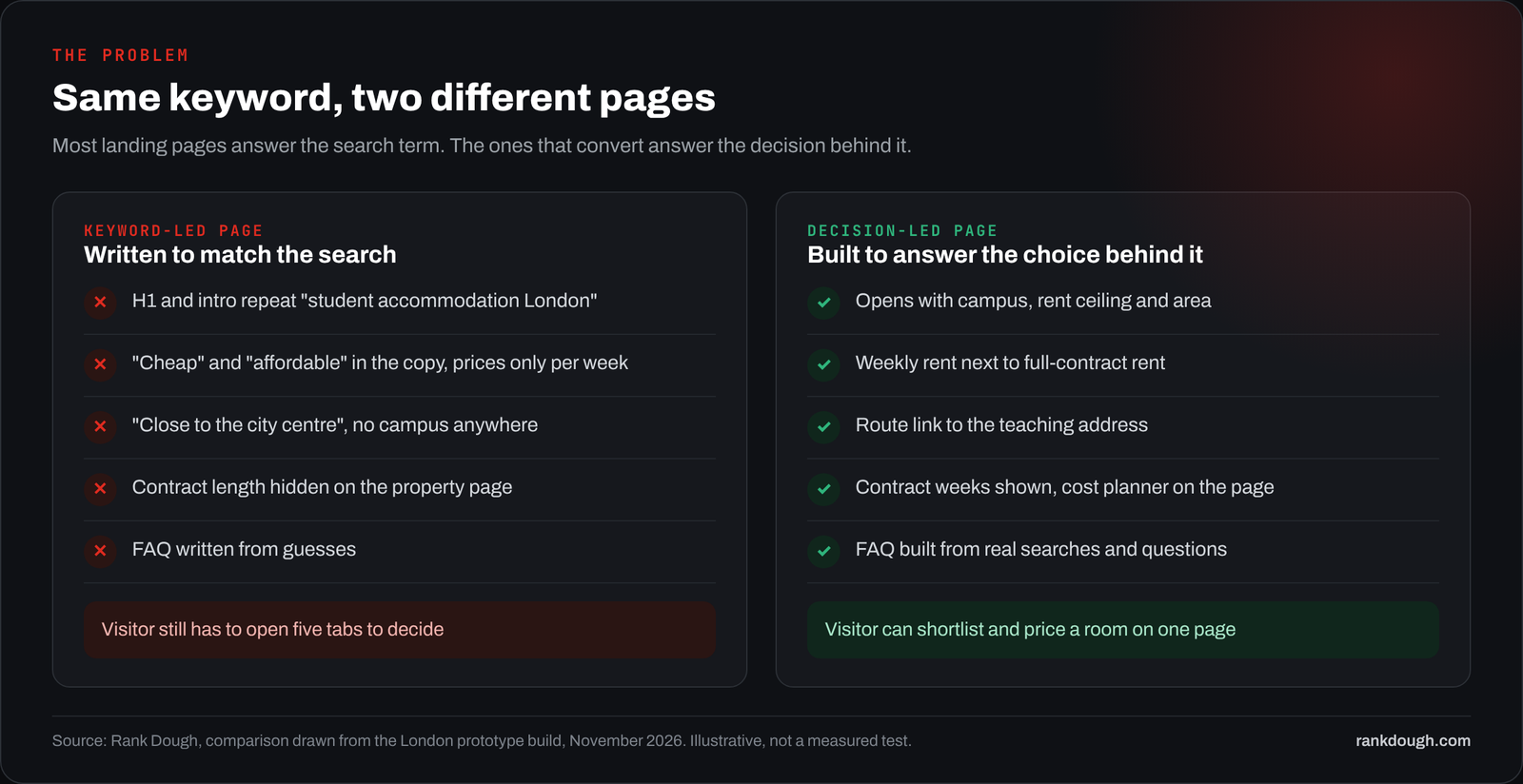
A high intent landing page has one job: help someone who is ready to choose make the choice on that page. Most pages I review do something else. They repeat the keyword, add a hero photo and a few lines about quality, then send the visitor off to five other tabs to work out the price, the terms and whether the thing fits.
Take “student accommodation London”. The keyword says London. The person searching wants to know which rooms they can afford, how far each one is from their lectures, how many weeks they pay for, and whether the person paying will agree. A page that answers the keyword and none of those questions ranks for a while and converts badly.
The fix is not more copy. It is working out the decision behind the search, finding evidence for it in your data, and building the page around that decision. AI is very good at the building part. It is bad at the deciding part, and it fills every gap you leave with confident guesses.
Research outside our own build points the same way. Hidden or unclear costs are a top reason people walk away at checkout, most attention goes to the first screen, and plain copy converts better than clever copy.
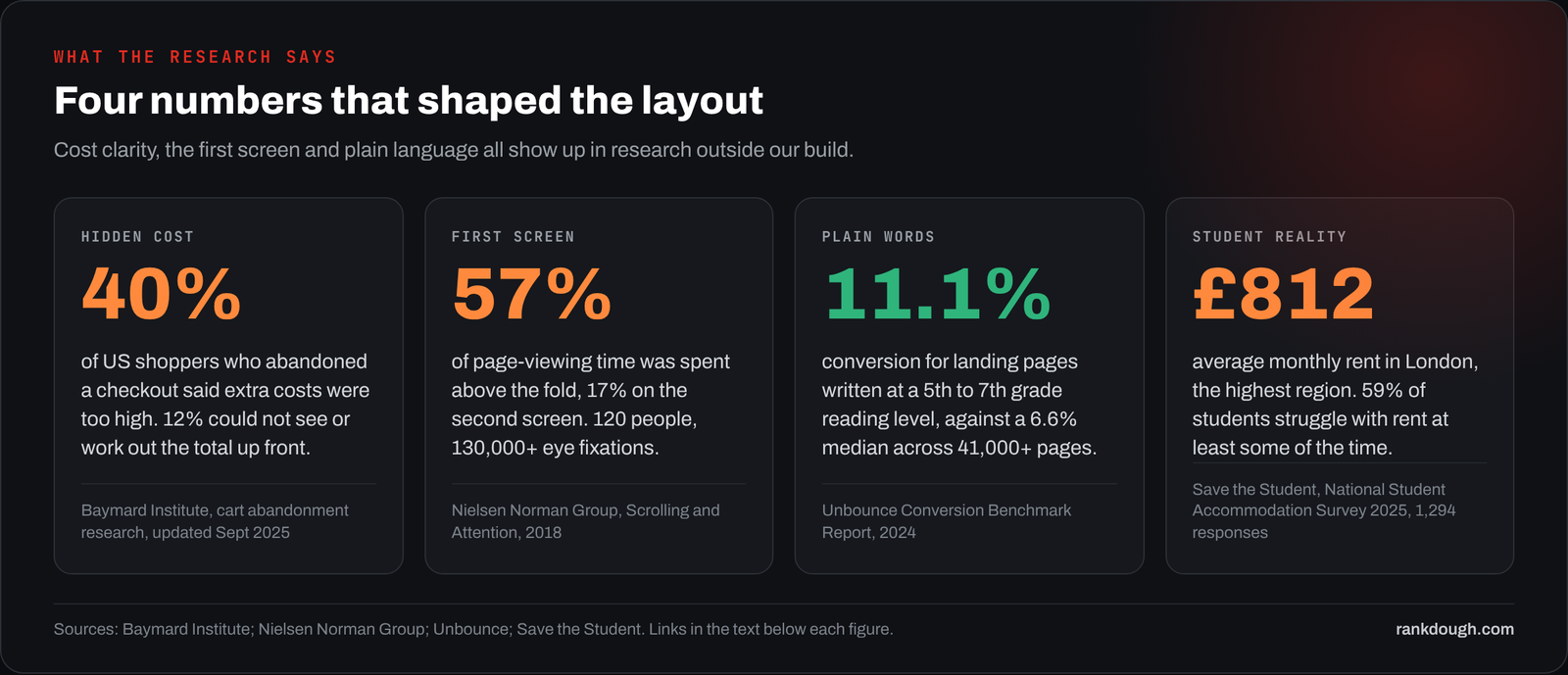
Sources: Baymard Institute, cart abandonment rate (updated September 2025); Nielsen Norman Group, Scrolling and Attention (2018); Unbounce Conversion Benchmark Report (2024); Save the Student, National Student Accommodation Survey 2025.
None of those studies measured a student accommodation page. I use them as reasons to test a layout, not as proof that a layout works.
What does the workflow look like from data to page?
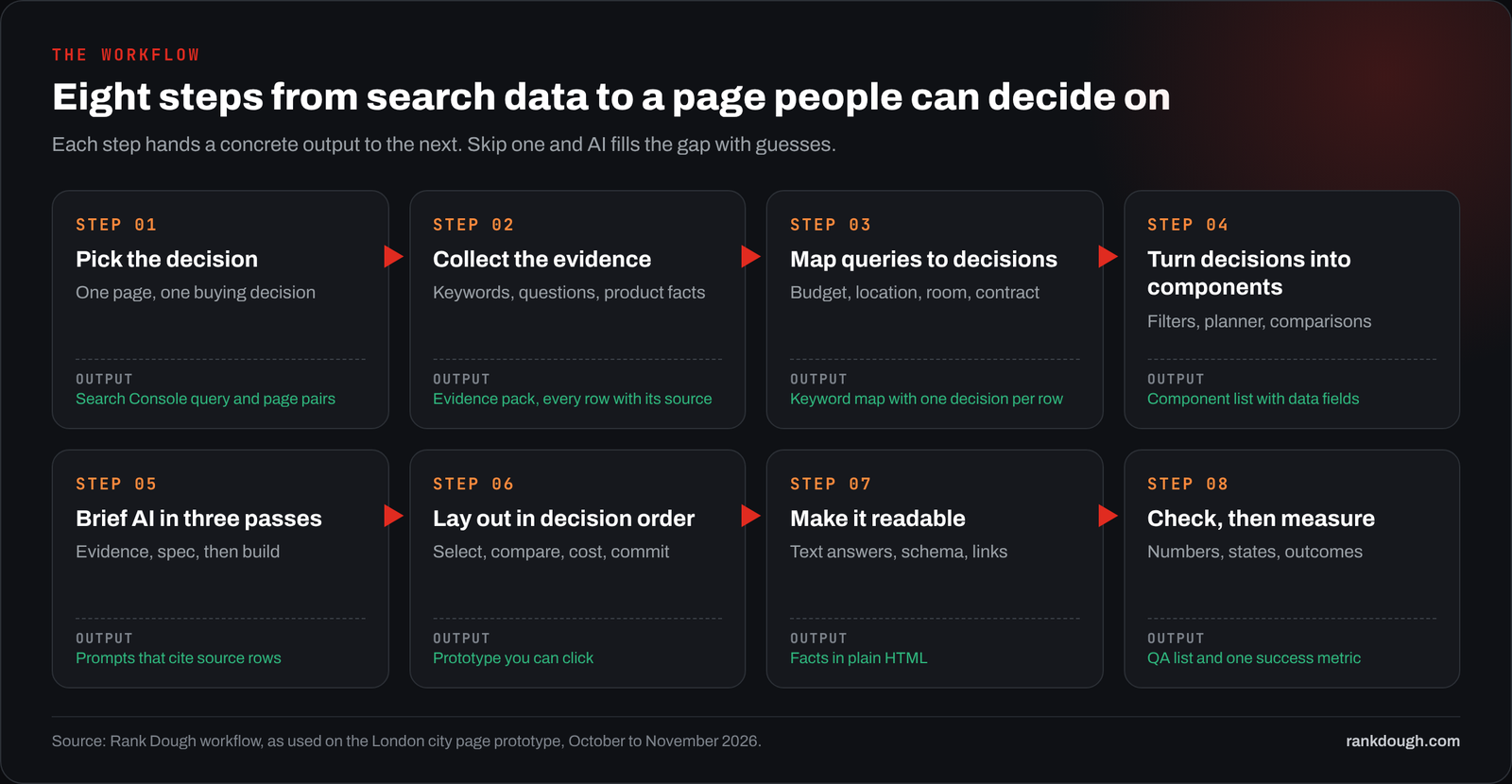
It is eight steps, and each one hands a concrete output to the next. Steps 1 to 4 are data work: what the page is for, what evidence you have, which decisions the searches point to, and which components answer them. Steps 5 to 8 are build and proof: briefing AI, laying the page out, making it readable for search and AI answers, then checking and measuring it.
The example all the way through is a London city page we prototyped for a UK student accommodation marketplace in October and November 2026. The client is not named, and the brand is blurred in every screenshot.
Step 1: Which decision should the page own?
Write the page’s job in one sentence before you touch any tool. Ours was: “Help a student find London rooms that fit their budget and campus, see the full cost of the stay, and take the plan home.” Everything that doesn’t serve that sentence goes lower on the page or off it.
Then check that you aren’t about to build a second page for a job an existing URL already does. Two pages chasing the same searches split the clicks and confuse Google about which one to show.
- In Search Console, open Performance, filter queries containing the topic (here “london”) and switch to the Pages tab.
- Note every URL that already gets impressions for those queries, and its average position.
- If an existing page sits in the top five, improve it rather than adding a new one.
- If an older page targets the same intent and performs worse, plan a 301 redirect to the new one.
- Write the chosen URL into the brief so nobody builds a duplicate later.
PROMPT TO TRY
Here is a Search Console export of queries and pages for the last 90 days. Group the queries that contain [topic] by intent. For each group, list the URLs that get impressions, their clicks and average position. Tell me which single URL should own each group and flag any group where two URLs compete.
Step 2: What data do you need before you open an AI tool?
You need four kinds of evidence, and a keyword export is only one of them. Keyword data tells you what people type. It cannot tell you what you sell, what it costs, or why buyers hesitate.
| Source | What to pull | What it decides | What it can’t tell you |
|---|---|---|---|
| Ahrefs or another keyword tool | Query, UK volume, date, ranking URLs | Demand and the words people use | Who buys, or what is in stock |
| Search Console | Query, page, clicks, impressions, position | Which URL owns the topic today | Why visitors didn’t convert |
| Questions from customers | Site chat, sales emails, support tickets, Reddit, People Also Ask | What stops people choosing | How common each worry is, unless you count it properly |
| Product or booking data | Prices with units, contract weeks, room types, locations | Which comparisons and promises are possible | Whether anyone wants those options |
Source: Rank Dough evidence pack template, used on the London prototype, October 2026.
Keep the source and date next to every row. When a figure turns up later in copy, a chart or an AI answer, you should be able to point to the row it came from in under a minute.
FROM OUR BUILD
We built one keyword map for the whole UK before touching the London page: 26,716 keywords and ideas from Ahrefs, Search Console and research, of which 5,066 have an Ahrefs volume. Every keyword has one category, one content format and one page or action. Brands, overseas searches and irrelevant terms sit in an excluded group (2,994 keywords) instead of quietly inflating the totals.
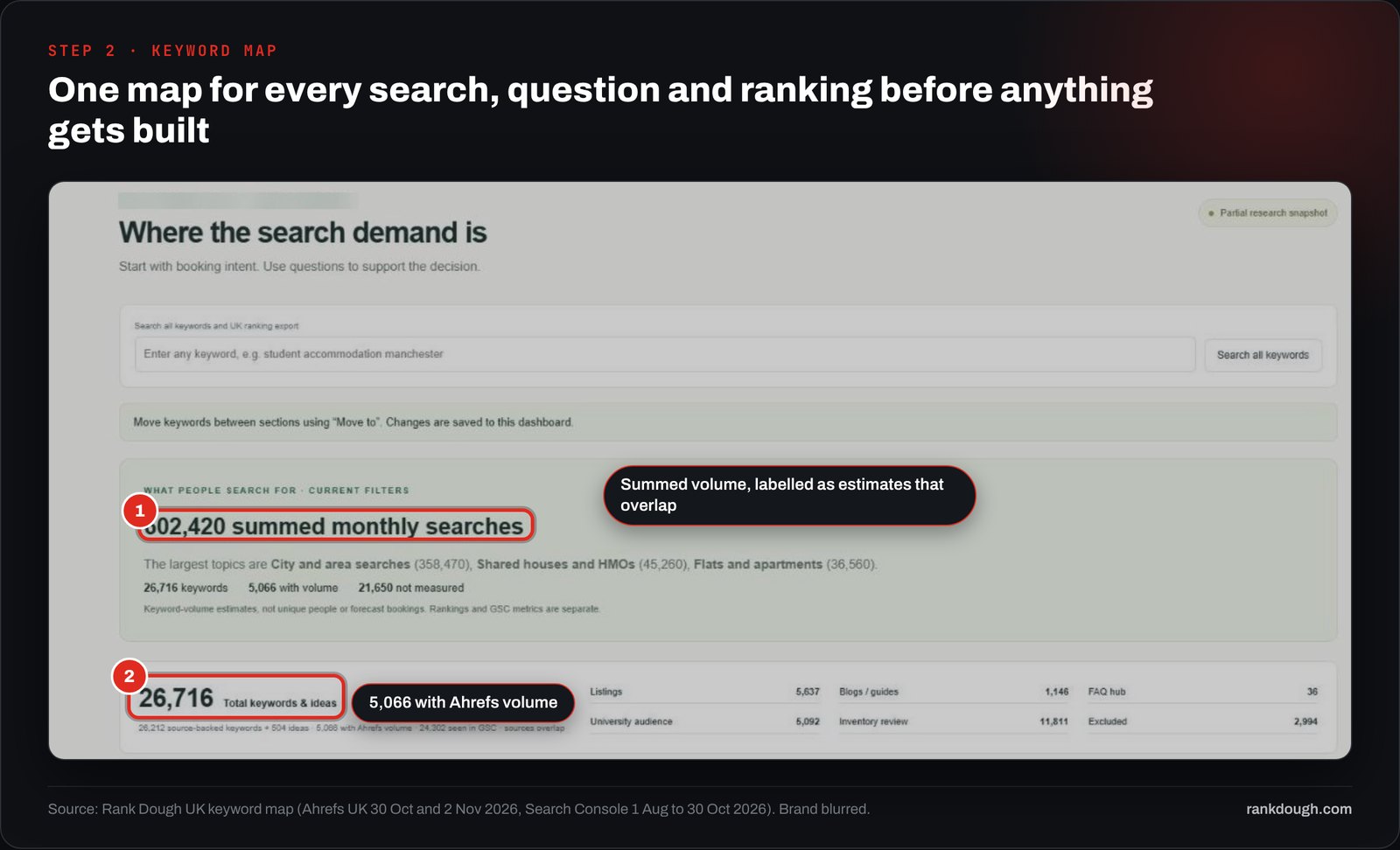
Source: Rank Dough UK keyword map: Ahrefs UK volumes pulled 30 October and 2 November 2026, Search Console 1 August to 30 October 2026.
HACKMark which volumes are measured and which are blank. Of the 26,716 rows in our map, 21,650 have no measured volume. A missing volume is “not measured”, never zero demand, and AI tools will treat it as zero unless you tell them otherwise.
Step 3: How do you turn keywords into buying decisions?
Read every keyword as a question the visitor is trying to answer. “Cheap student accommodation London” is a budget question. “Student accommodation near UCL” is a location question. “How many weeks do you pay for student accommodation” is a contract question. Group the rows by decision, not by topic.
Start wide, then go narrow. Across the UK map, transactional searches split into topics such as city and area searches, flats, studios and private accommodation.
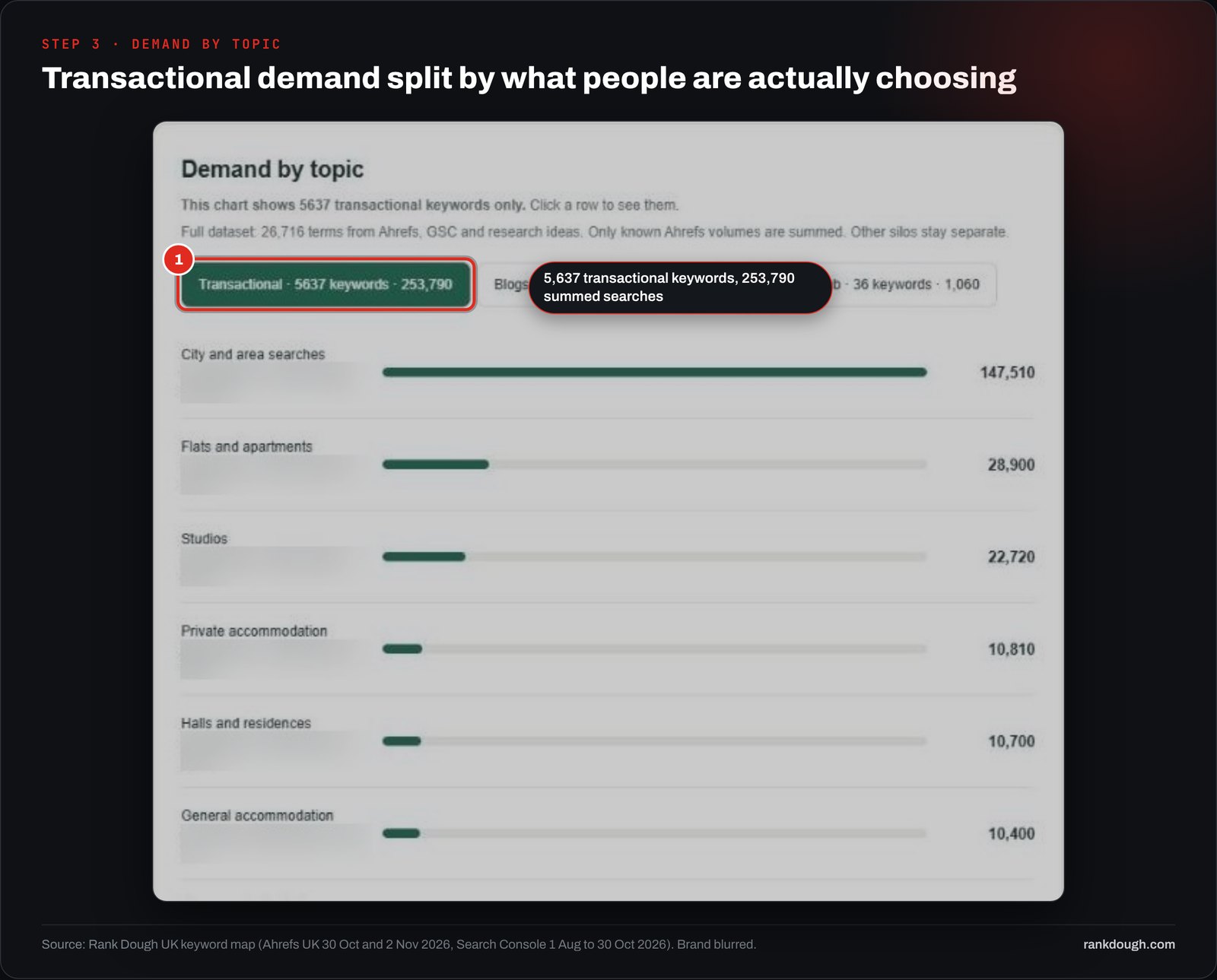
Source: Rank Dough UK keyword map: Ahrefs UK volumes pulled 30 October and 2 November 2026, Search Console 1 August to 30 October 2026. Volumes are summed estimates for the measured keywords only.
Then zoom into the page you are building. For London, the broad term carries the volume, but the smaller searches name the decisions the page has to support.
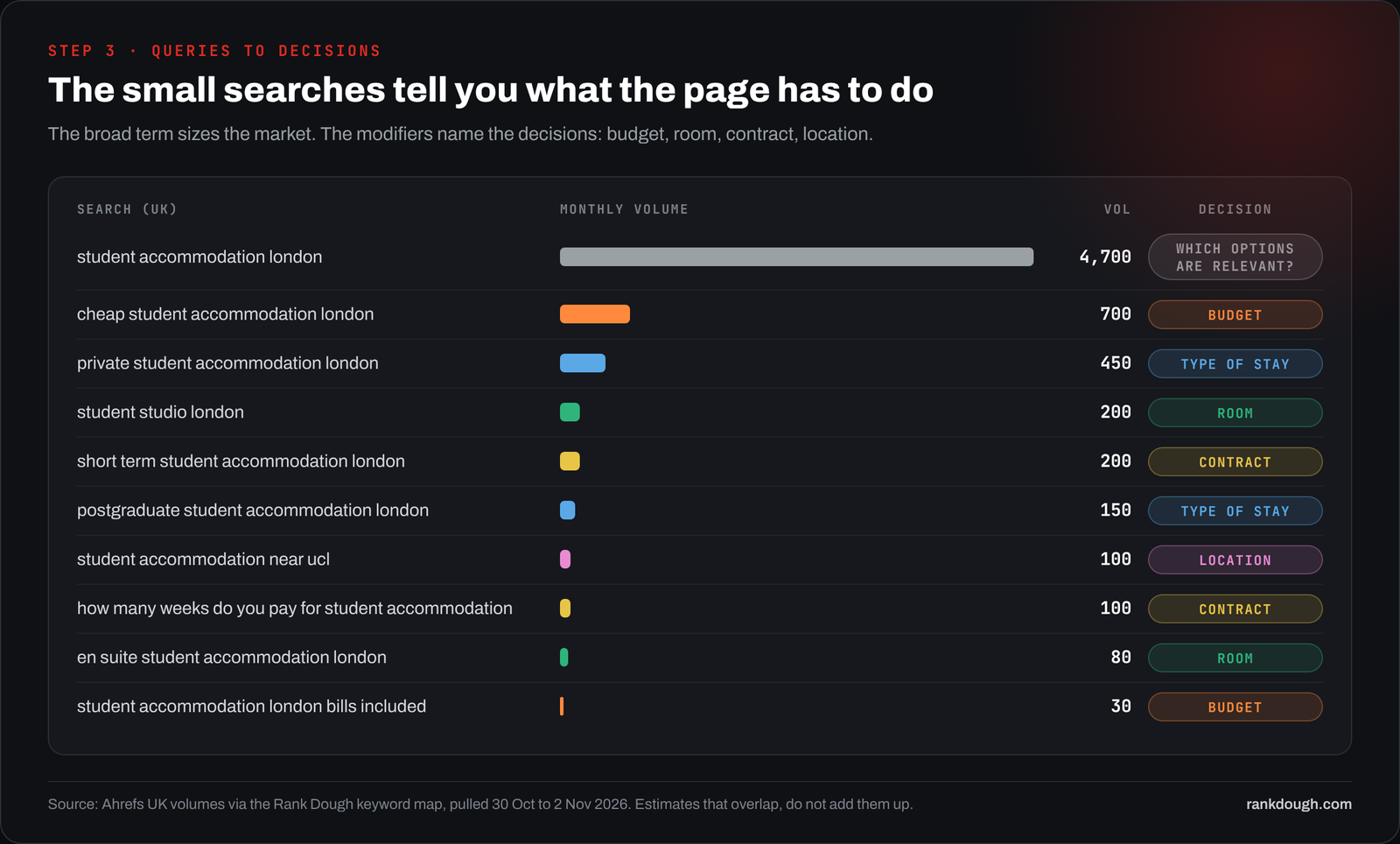
| Search (UK) | Monthly searches | Decision behind it | What the page must show |
|---|---|---|---|
| student accommodation london | 4,700 | Which options are relevant? | A list of real properties with filters |
| cheap student accommodation london | 700 | Budget | A rent ceiling, price sort, price per week and per stay |
| private student accommodation london | 450 | Type of stay | Who provides the room and who can book it |
| student studio london | 200 | Room | Room type and bathroom on every card |
| short term student accommodation london | 200 | Contract | Contract weeks for each option |
| student accommodation near ucl | 100 | Location | A route from each property to the campus |
| how many weeks do you pay for student accommodation | 100 | Contract | Weeks × rent shown next to the weekly price |
Source: Ahrefs UK volumes via the Rank Dough keyword map, pulled 30 October to 2 November 2026. Volumes overlap, so the rows are not added together.
Method: we took the London rows with a measured volume from the map and tagged each with the one decision it most clearly points to. Rows that fit no decision stayed as general demand.
Volume sizes demand. It does not rank decisions. The 100-search campus query asks for a harder feature than the 4,700-search broad term, and the page fails that visitor if it is missing.
PROMPT TO TRY
Here are [N] keyword rows with UK volume and date. Tag each row with the buying decision it points to (budget, location, room, contract, type of stay, or general). Return a table grouped by decision with the summed volume per group, and list rows you could not tag. Do not merge or rename keywords. Do not add volumes you were not given.
Step 4: How do decisions become page components?
Give every decision one main component and one supporting detail, and write down the data field each one needs. If you can’t name the field, you can’t build the component properly yet.
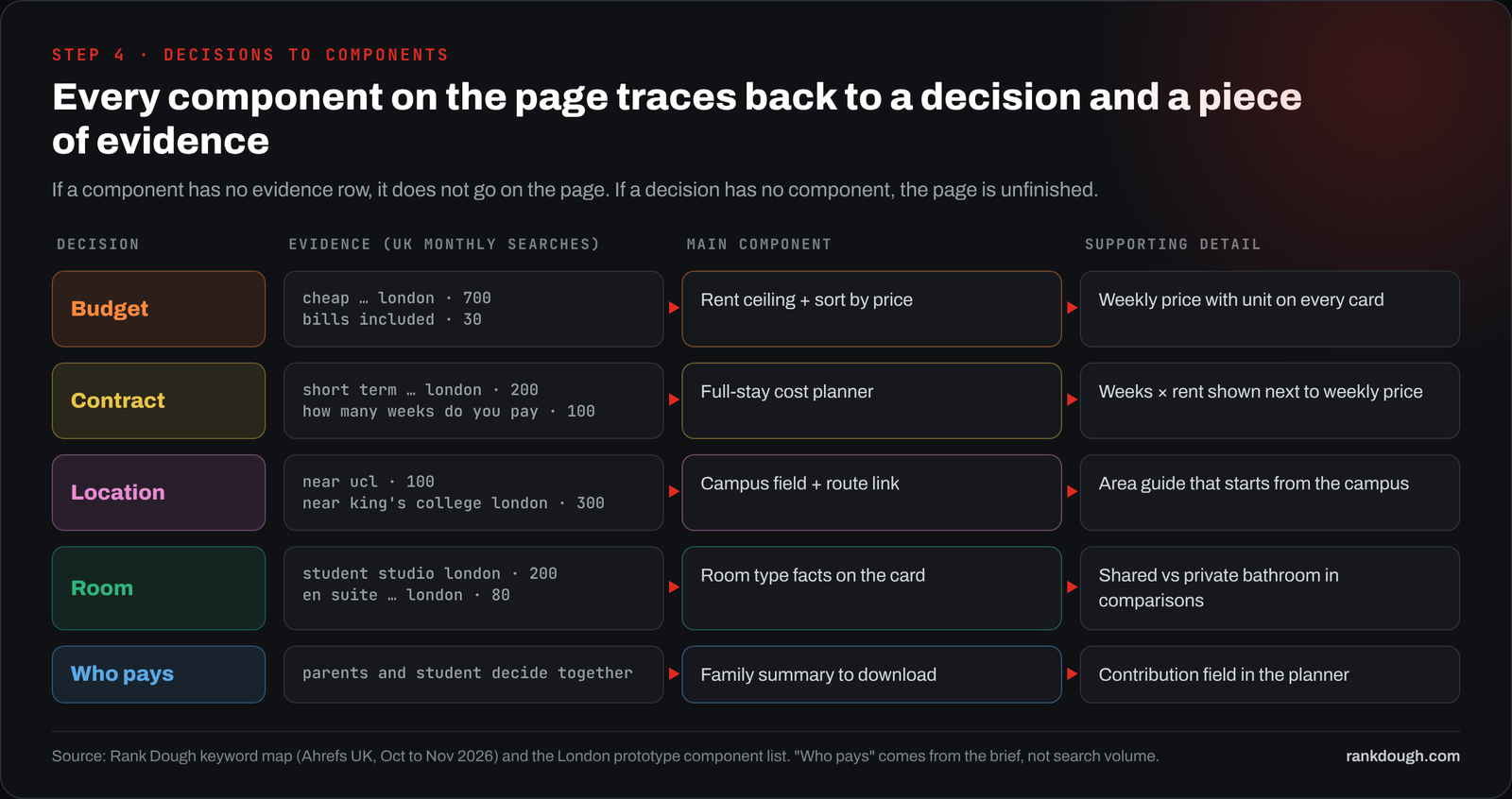
The contract decision shows why this matters. A weekly price filter tells you which room is cheaper per week. It doesn’t tell you which room costs less, because rooms run on different contract lengths.
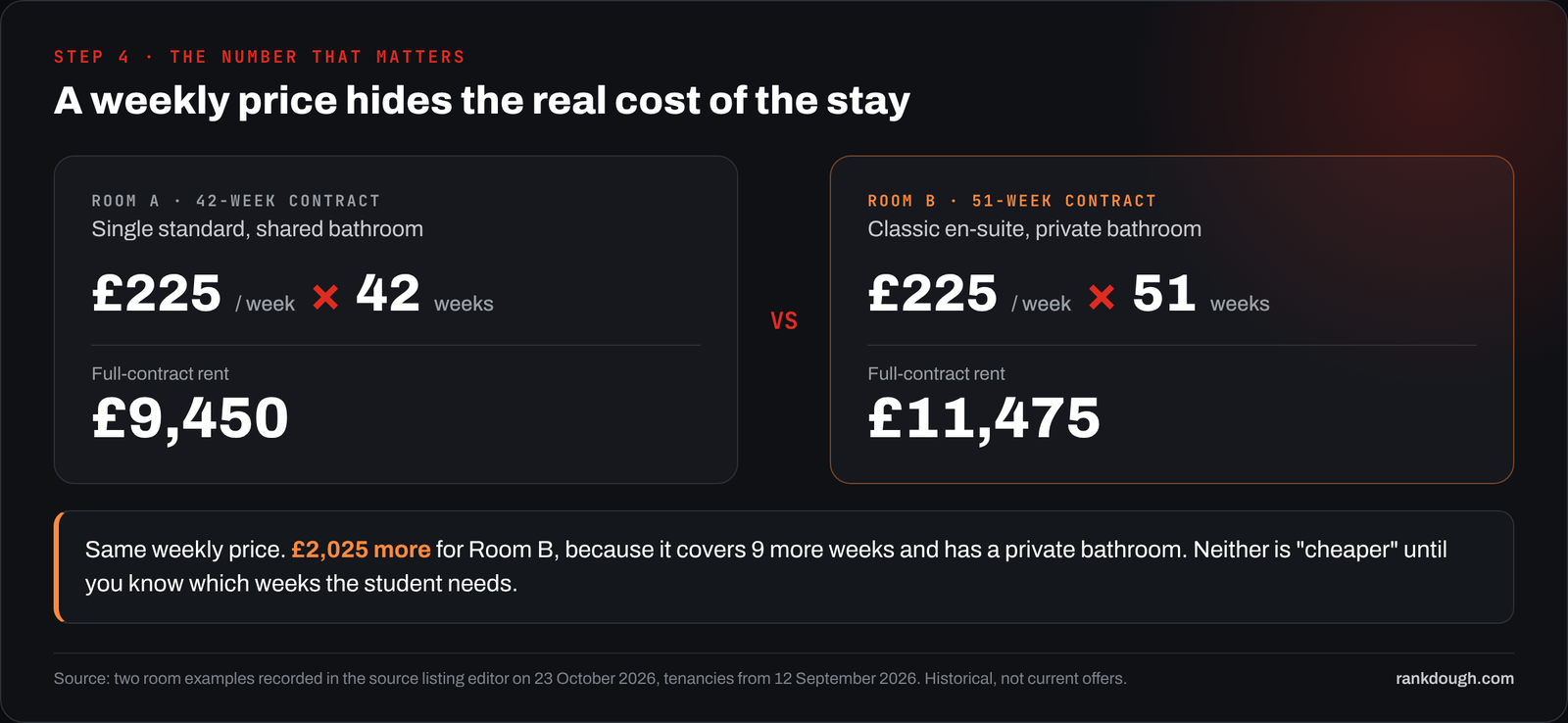
Source: room examples recorded in the source listing editor on 23 October 2026 for tenancies from 12 September 2026. Historical, not current offers.
We put that comparison on the page itself as a small table under the cost planner, with a one-line summary a visitor can read without opening anything.
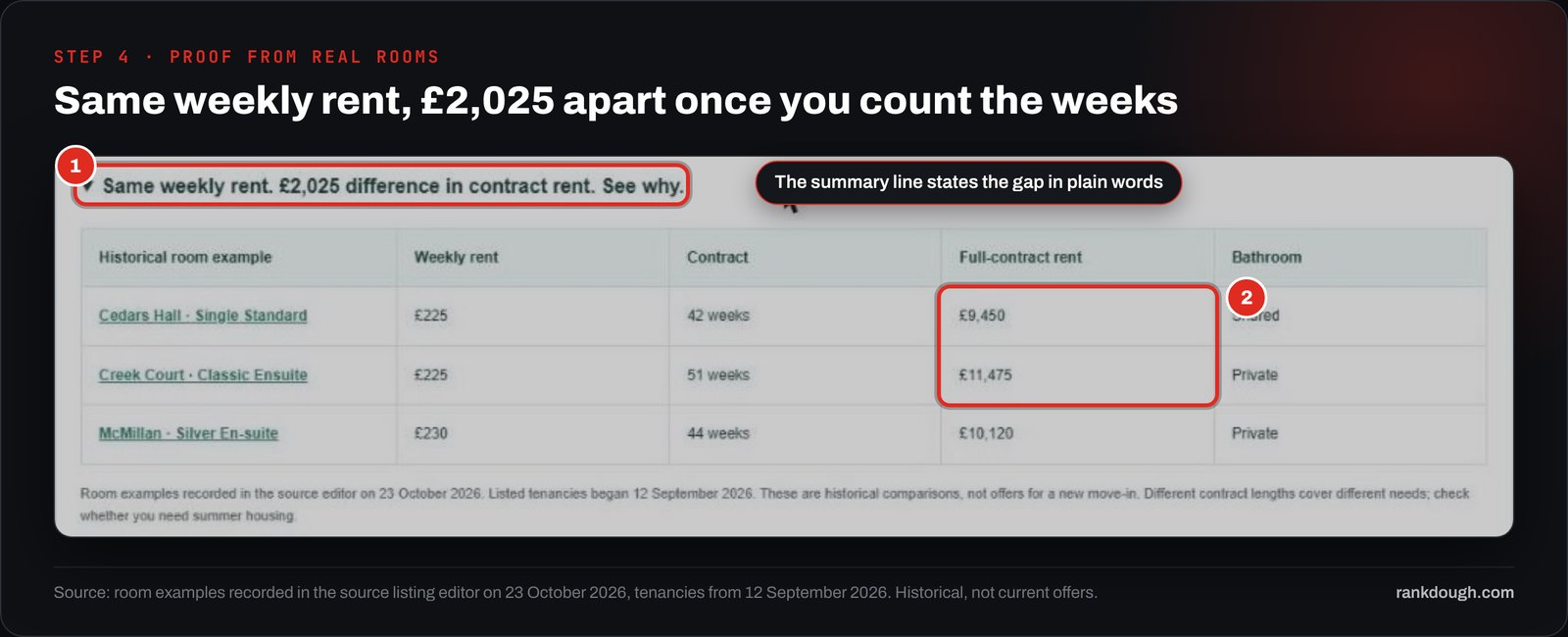
| Room example | Weekly rent | Contract | Full-contract rent | Bathroom |
|---|---|---|---|---|
| Single standard | £225 | 42 weeks | £9,450 | Shared |
| Classic en-suite | £225 | 51 weeks | £11,475 | Private |
| Silver en-suite | £230 | 44 weeks | £10,120 | Private |
Source: London prototype room examples, recorded 23 October 2026. £225 × 42 = £9,450; £225 × 51 = £11,475; £230 × 44 = £10,120.
The main component for this decision is a full-stay cost planner. The visitor enters the exact weekly rent and contract weeks, adds their own living and travel estimates, and gets one number for the whole stay.
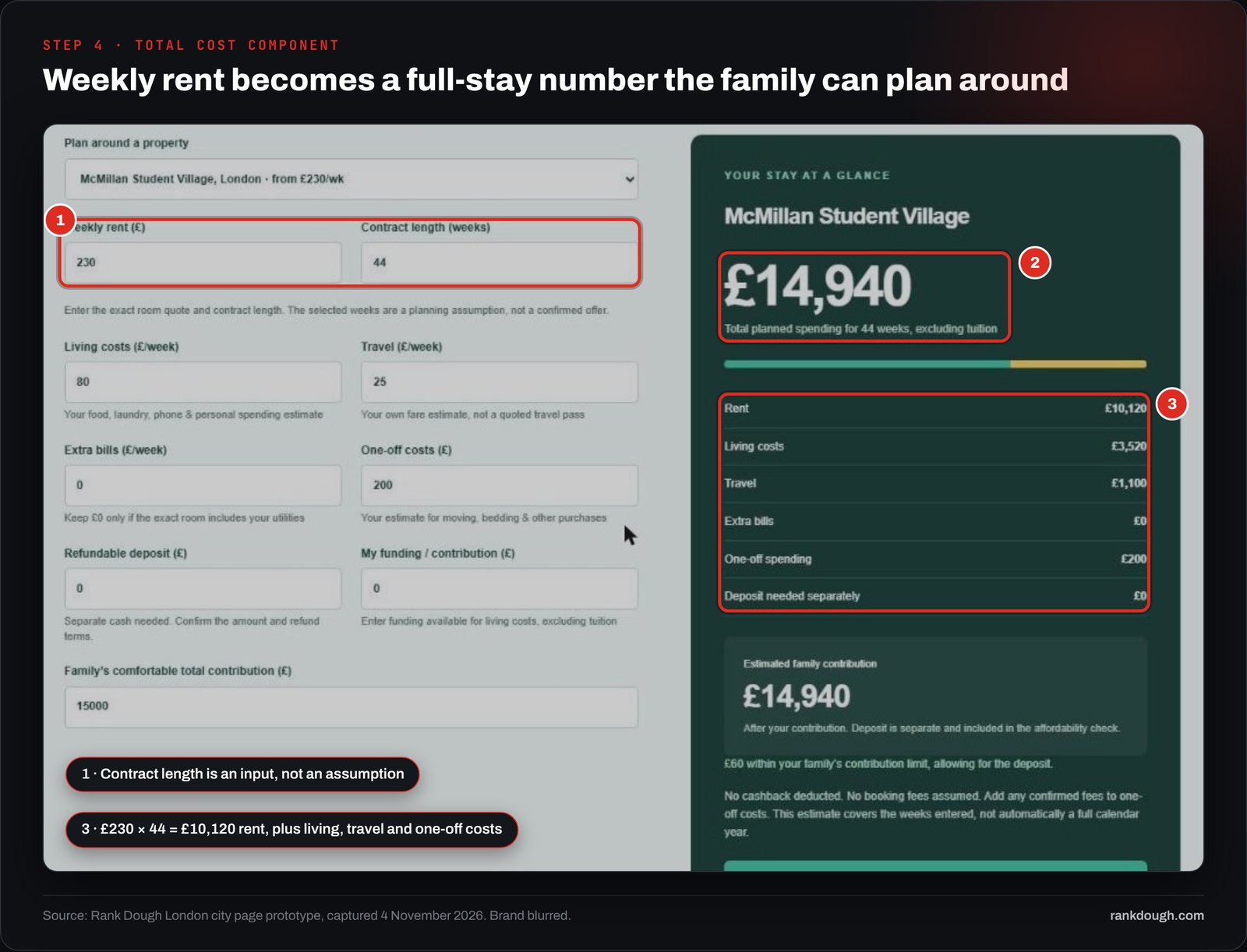
Source: London prototype planner with its default inputs, 4 November 2026. £10,120 rent + £3,520 living + £1,100 travel + £200 one-off = £14,940.
HACKNever let a missing contract length default to 52 weeks. Leave the total blank and ask for the weeks. A planner that quietly assumes a full year overstates the cost of every shorter contract, and the visitor has no way to spot it.
Step 5: How do you brief AI so it builds what the data says?
Split the job into three passes and read the output of each one before you start the next. One long prompt that says “build me a landing page from this data” lets a single weak assumption run through the copy, the filters and the maths at once.
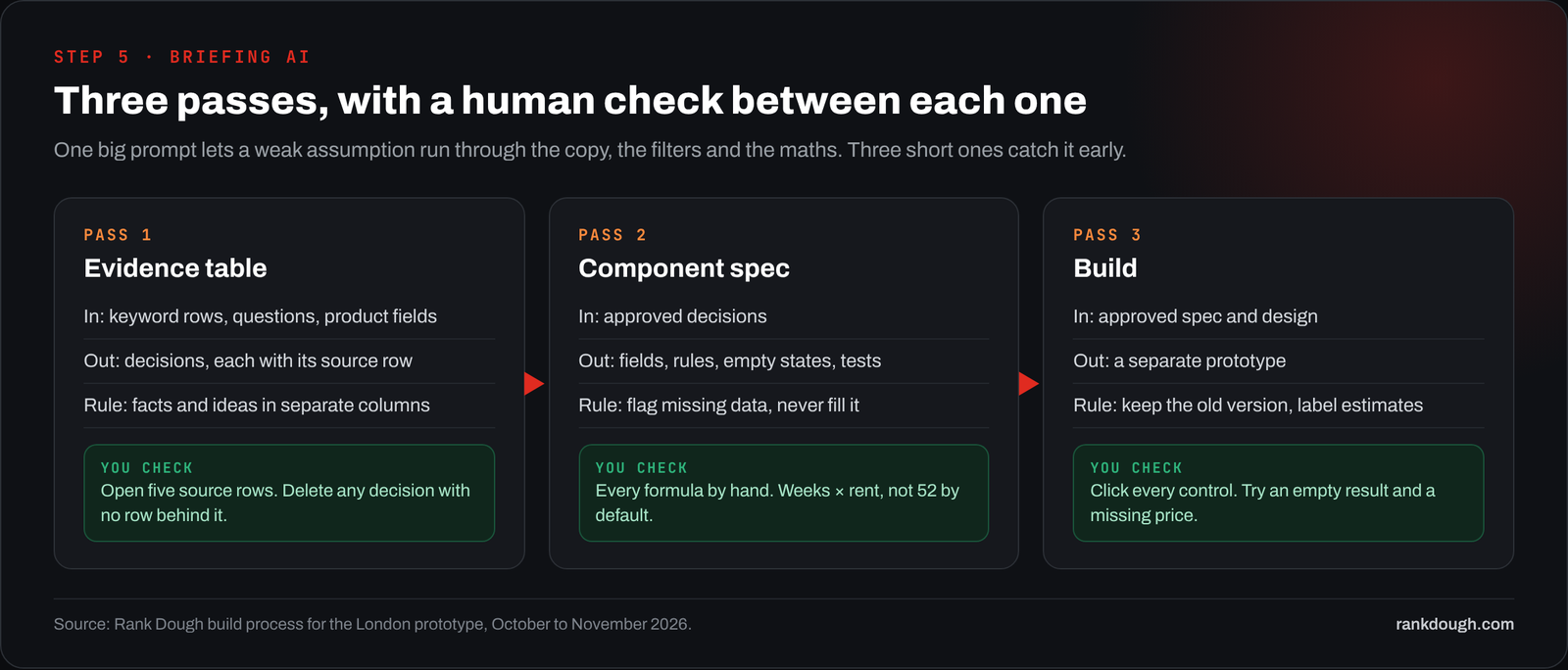
Pass 1: the evidence table. Ask AI to list the decisions the page must support, each with the source row behind it, and to keep facts and ideas in separate columns.
PROMPT TO TRY
Using the keyword rows, customer questions and product fields below, list the buying decisions this page must support. For each decision give: the source rows, what they show, what is missing, and a suggested page component. Put observed facts and your recommendations in separate columns. Do not call anything “most popular” unless I gave you counts.
Pass 2: the component spec. For each decision you approved, ask for the fields, labels, formula, empty state and a test.
PROMPT TO TRY
For each approved component, define: input fields, visible labels, the calculation or filter rule, what shows when a value is missing, and one test I can run by hand. Use the field names in the product data exactly. If a field you need is missing, say so instead of inventing a default.
Pass 3: the build. Only now does AI write code and copy, as a separate version so you can compare it with the last one.
PROMPT TO TRY
Build a new version of the page from the approved spec. Keep the previous version untouched. Use only the verified facts supplied. Label estimates and historical examples as such on the page. List every component you built and the tests still to run.
FROM OUR BUILD
Most of the corrections in our build happened between passes. In the first pass AI described a handful of Reddit questions as “the most popular student concerns”. There was no count behind that, so the line became “questions students raise” and the claim never reached the page.
Step 6: In what order should the page be laid out?
Lay the page out in the order people make the decision. Each block answers the next question a visitor has, and optional blocks sit below the tools, never above them.
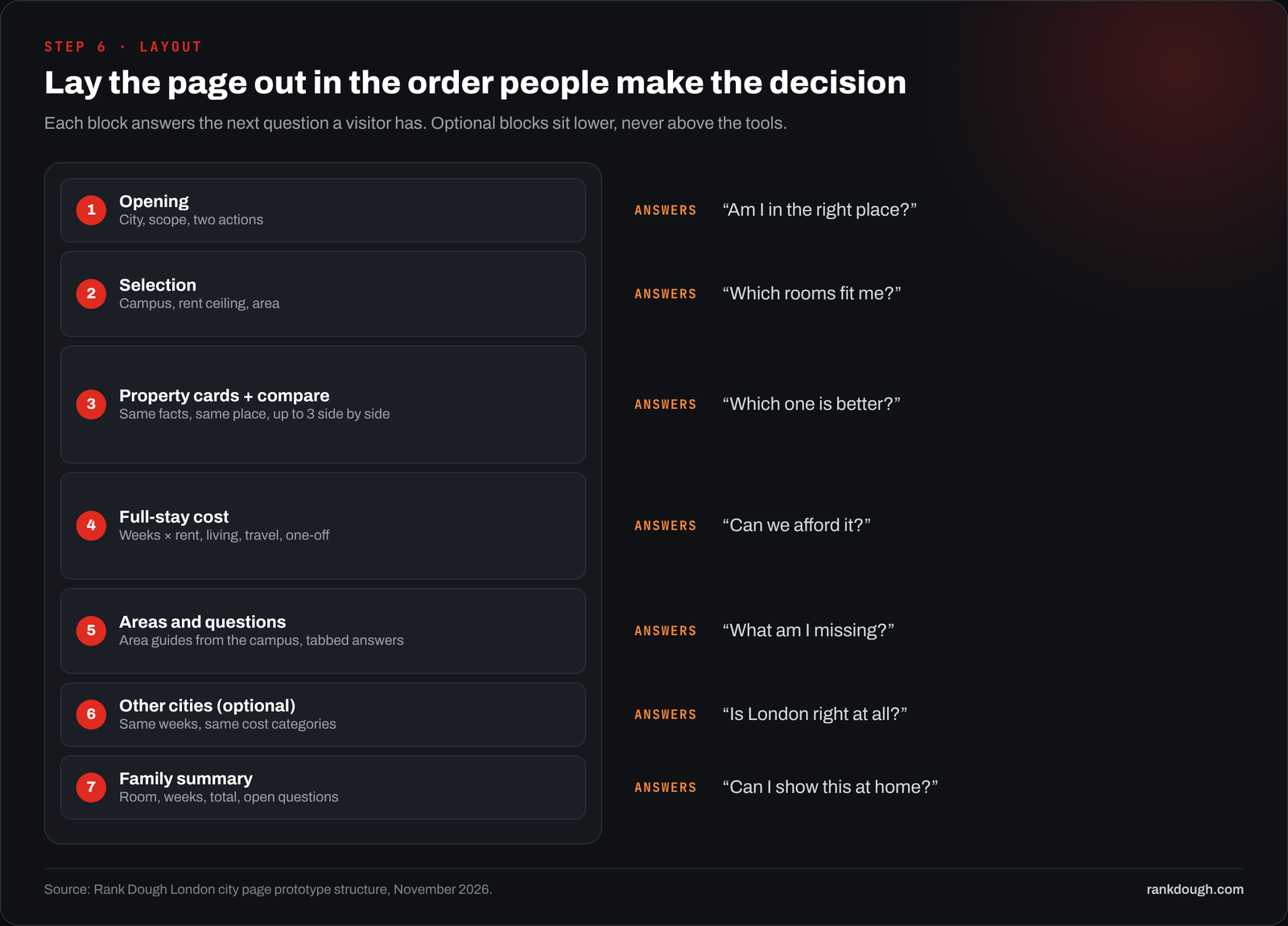
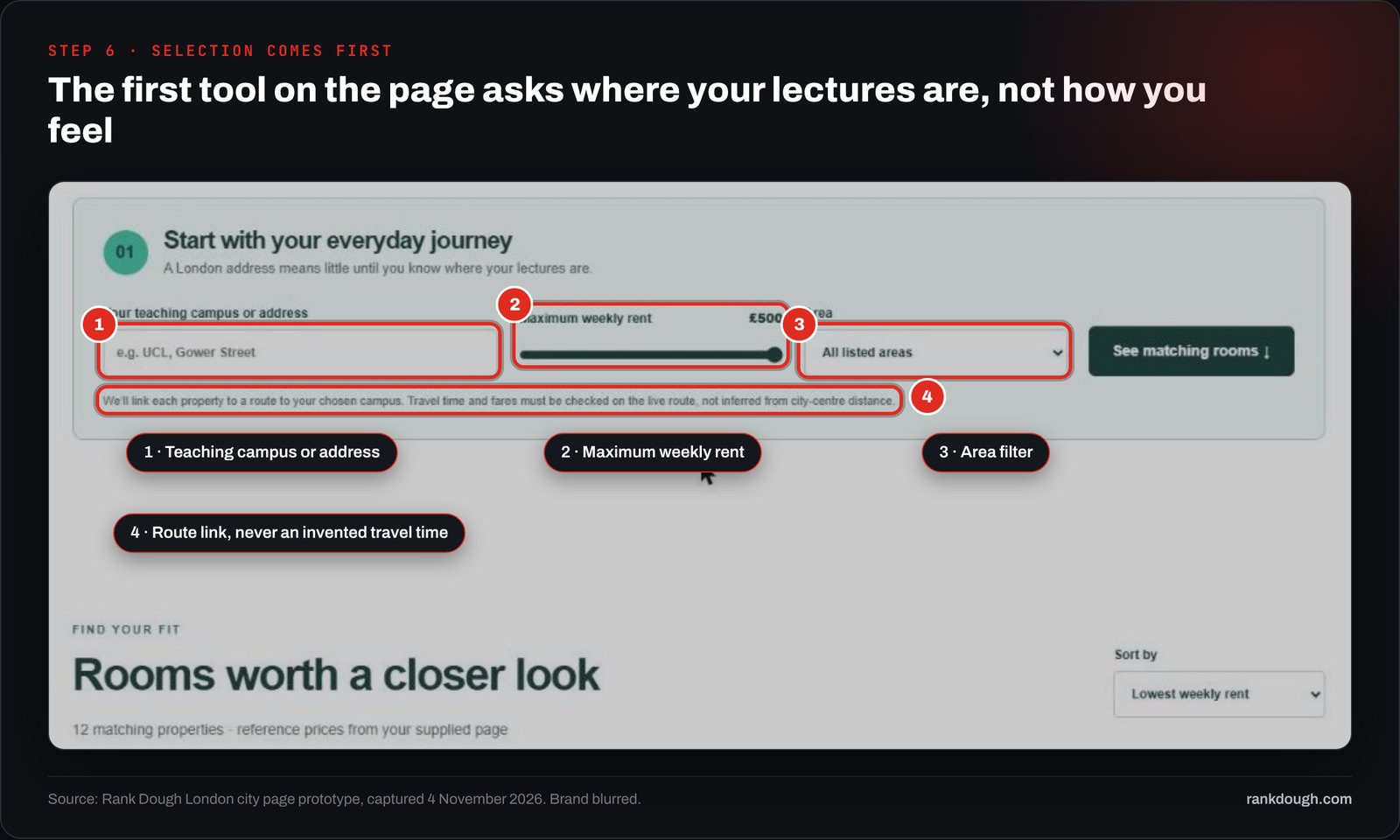
The first tool asks where the visitor studies and what they can pay. London is too big for “near the centre” to mean anything, so the campus field comes first, and the page links to a route rather than printing a travel time it can’t stand behind.
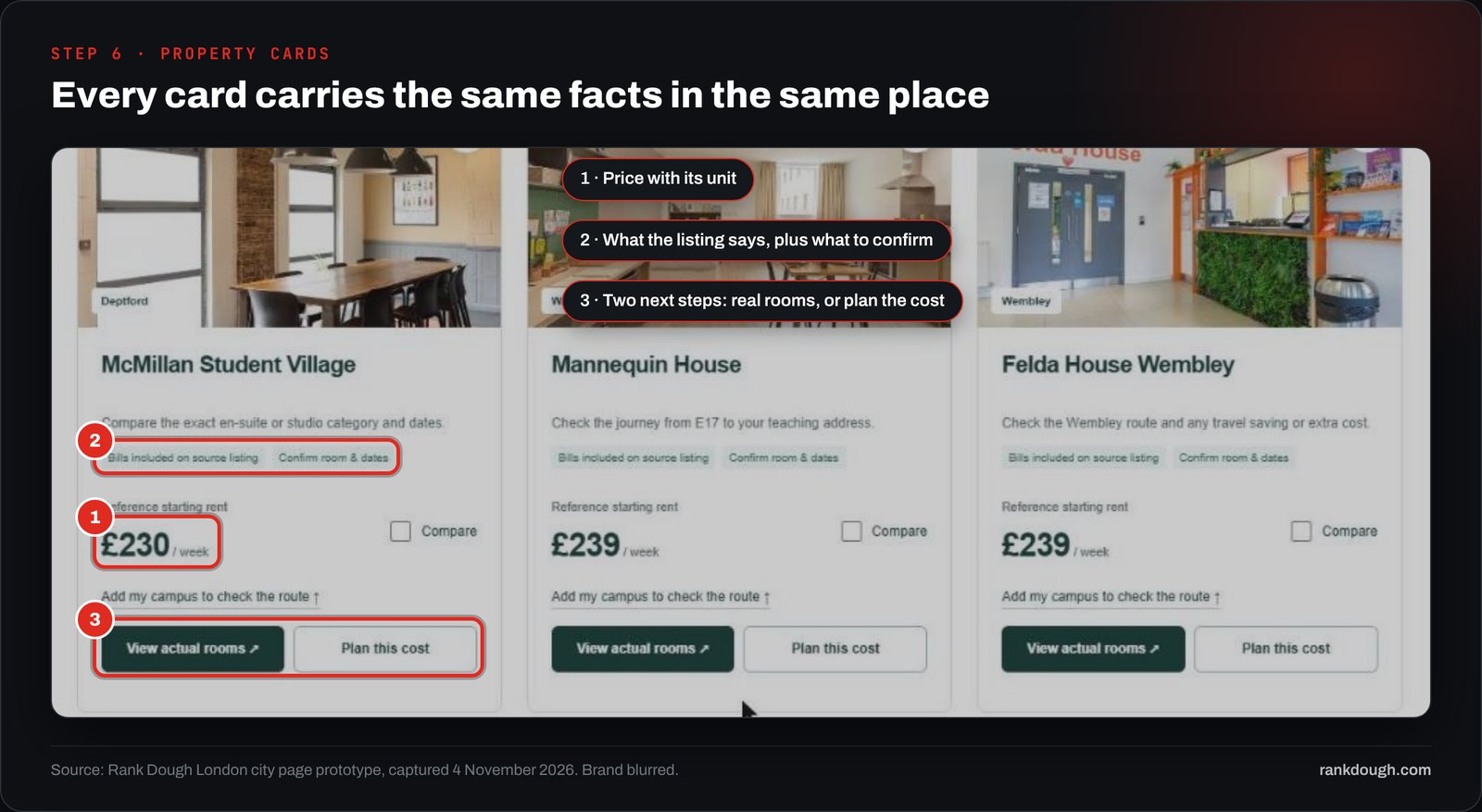
The property cards then carry the same facts in the same place, so a visitor can compare without opening each one. Price always has its unit. Each card says what the listing claims and what still needs confirming.
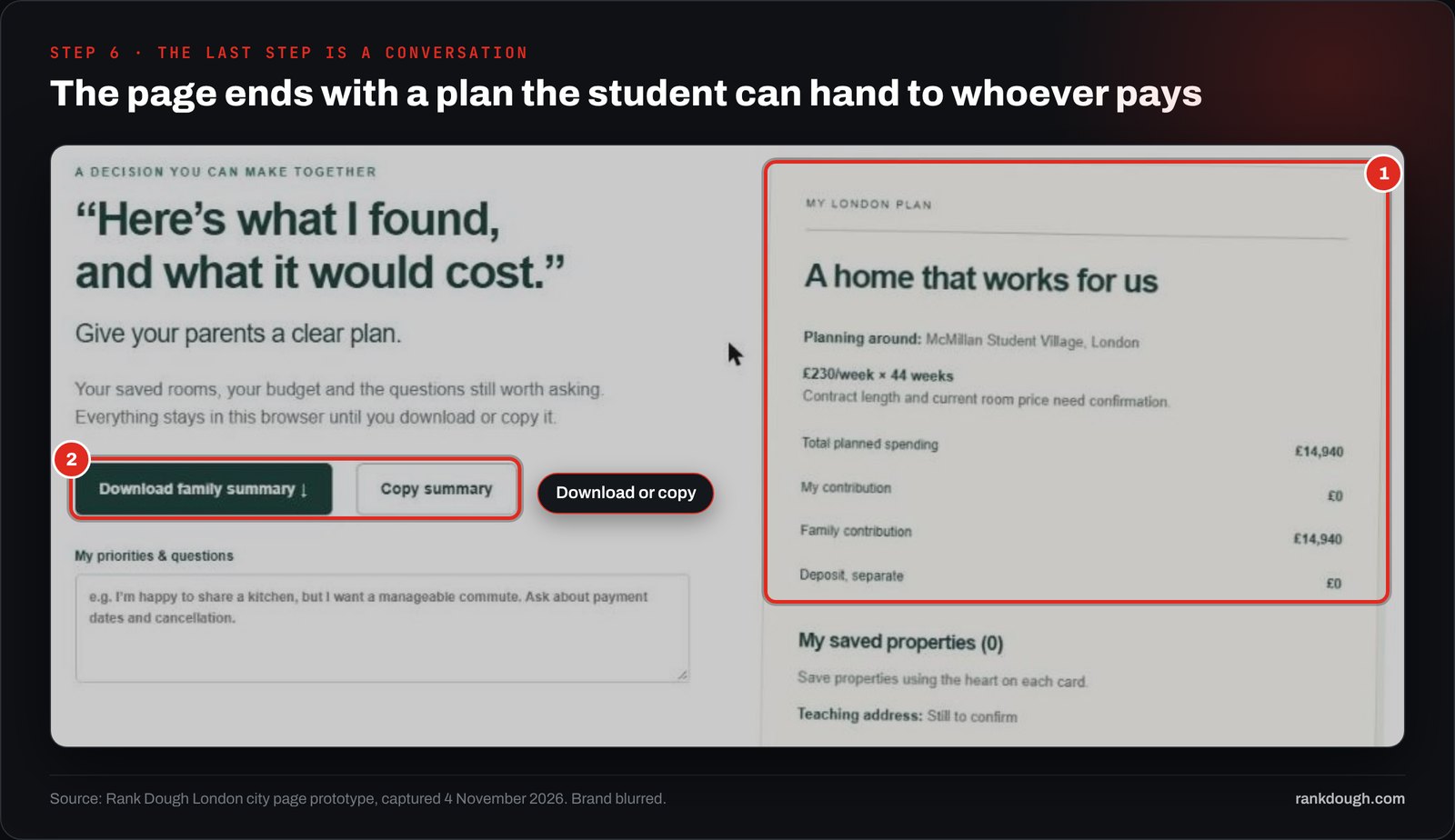
The page ends with a plan the student can take home. For a student, the decision often isn’t theirs alone. The summary puts the room, the weeks and the total in one card they can download or copy.
Source: Rank Dough London city page prototype, captured 4 November 2026. In the prototype, 12 properties carry reference starting rents from £230 to £450 a week; 7 of them are at or under £270.
Step 7: How do you make the page readable for Google and AI answers?
Put the important facts in plain text on the page, not only inside a calculator or an image. Google says there are no extra requirements to appear in AI Overviews or AI Mode, and lists making important content available in text and keeping structured data in line with the visible page among its best practices.
Source: Google Search Central, AI features and your website, checked 4 November 2026.
- Write each key fact as a sentence that stands on its own: “At £225 a week for 51 weeks, rent comes to £11,475.”
- Keep units, dates and assumptions next to the number, so the line still makes sense when it is quoted on its own.
- Use one clear H1 and a title that names the place and the offer.
- Answer the question searches in a short FAQ near the bottom, with FAQ schema that matches the visible text word for word.
- Link each card to the exact property page and each area to its own guide.
- Check the rendered page, not the template: the facts must be in the HTML a crawler receives.
Don’t spin up a page for every filter combination because AI makes it cheap. A studio filter on the London page serves “student studio london” well. A separate studio page only earns its place if it has enough studios to show and a reason to exist on its own.
Step 8: What do you check before the page goes live?
Check the numbers, then the states, then the task. In my experience the first check gets done and the last one gets skipped.
| Check | How | Pass when |
|---|---|---|
| Every number | Recalculate weeks × rent and every total by hand | All totals match the text and the source rows |
| Empty and missing states | Filter to zero results; remove a price; remove contract weeks | The page says what is missing instead of showing £0 or a guess |
| The task | Ask someone new to find every room under £270 a week | They find 7 of 12 without help |
| Small screens | Repeat the task on a phone and with a keyboard only | Same result, nothing hidden behind a hover |
Source: Rank Dough QA list for the London prototype. The 7 of 12 answer comes from the prototype’s reference rents.
FROM OUR BUILD
Our first “final check” covered facts and formatting and passed. It never asked whether the page or post was useful, and it wasn’t. A check that only looks for errors will pass work that is accurate and pointless, so the task test is now part of every review.
What went wrong in our build, and what did we change?
I’d rather show the misses than pretend the first version was right. These are the ones that taught us something.
| What happened | Why it mattered | What we changed |
|---|---|---|
| AI called a few Reddit questions “the most popular concerns” | No count sat behind the claim | Questions are labelled as sampled, never ranked without counts |
| The first versions were built around one persona, a parent paying | Students choosing alone had to scroll past it | Family summary and city comparison became optional blocks lower down |
| Journey times were easy to write and impossible to verify | A wrong “12 minutes to campus” breaks trust | Route links to the teaching address instead |
| A bar chart compared two contract totals | Readers couldn’t tell what the bars meant | Replaced by the two offer cards in Figure 8 |
One problem is still open. On a laptop screen 698 pixels tall, the first screen of the prototype is mostly headline and photo, and the campus and rent tools start right at the bottom edge.
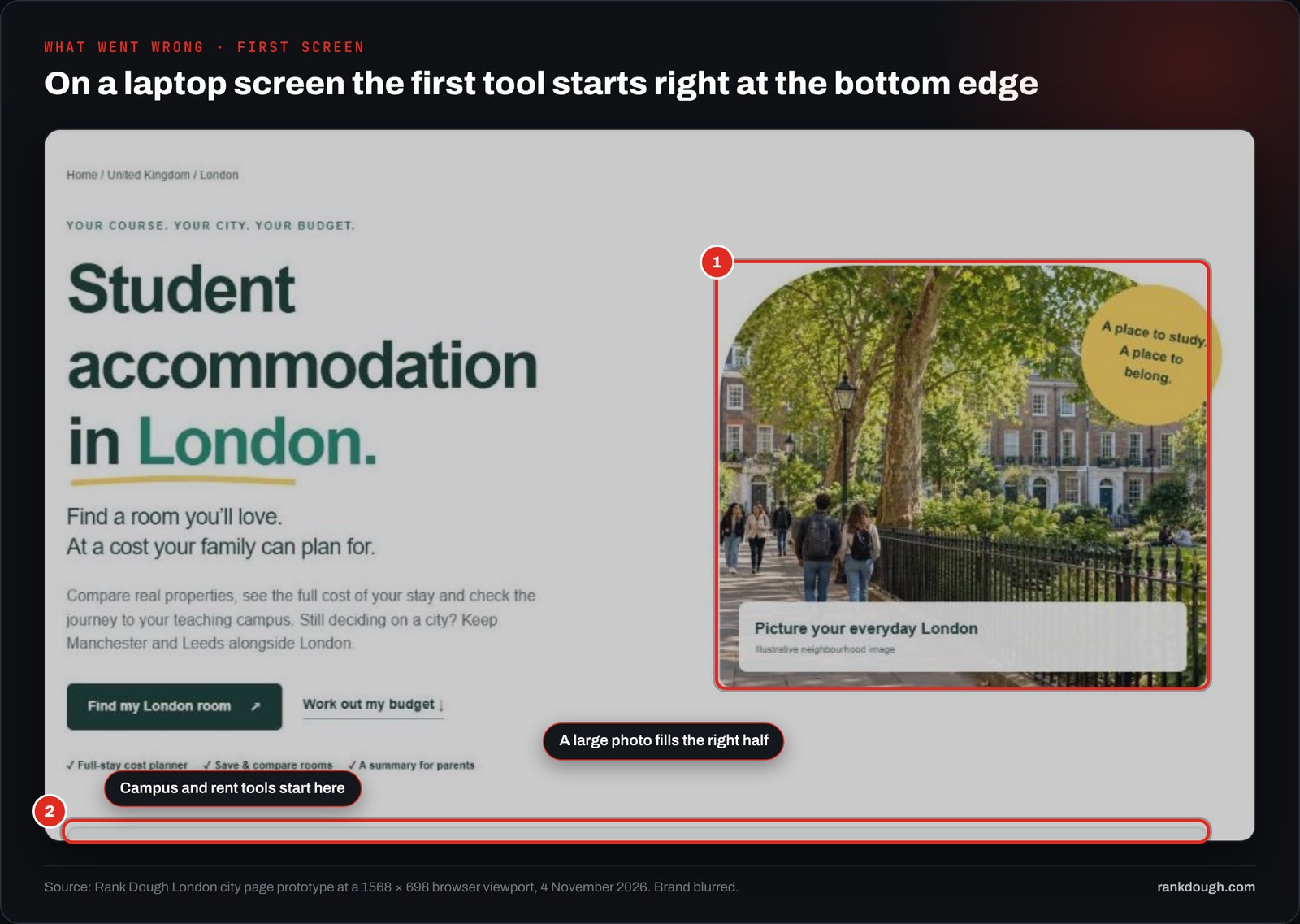
Nielsen Norman Group found people spend 57% of their viewing time above the fold. That is a reason to test a shorter opening with the tools visible, not proof that it will convert better. It is the next change on our list.
Does your landing page pass the decision check?
Tick what your current page already does. The check lists what is missing and links to the step that fixes it. The pass bands are Rank Dough’s judgement, not a measured score.
DECISION CHECK · 8 QUESTIONS
Tick the boxes that are true for your page today.
Plain version of the check: One sentence states the decision the page helps someone make; Every keyword group is tagged with a decision, not just a topic; Price shows its unit, and the full cost of the stay or order is visible; Each component on the page traces back to a source row; AI was briefed in separate passes, with a check after each; The selection tools are visible on the first screen; Key facts are written as plain sentences in the HTML; Someone new has completed the main task without help.
How do you know the new page works?
Pick one commercial outcome before launch and measure that, not a proxy. For the London page that is enquiries or bookings that start from the page. A saved room or a downloaded summary is a useful signal, but it isn’t a sale.
| Question | What to measure | Where |
|---|---|---|
| Are the right people arriving? | Clicks and impressions for the London query group | Search Console, by page |
| Can they find a room? | Share of visits that use a filter and see results | Analytics events |
| Do they go deeper? | Clicks through to a property’s real rooms | Analytics events |
| Does it make money? | Enquiries and bookings that start on the page | Booking system or CRM |
Source: Rank Dough measurement plan for the London page.
Compare the same weeks year on year where you can, because student housing is seasonal. Note the launch date, and any price, stock or campaign change in the same window. If several things changed at once, report the result as a pattern, not proof.
To be clear: the London page is a prototype. We have not measured rankings, bookings or AI citations from it yet, and this guide doesn’t claim any.
What else should you know before you build one?
What is a high intent landing page?
It is a page built for people who are ready to choose. It shows the options, the full cost and the conditions, so a visitor can shortlist and take the next step on that page instead of opening other tabs.
How many keywords do I need before I build one?
There is no fixed number. You need the main term plus the smaller searches that name decisions such as budget, location, room type or contract length. For the London page, ten measured searches (nine London ones and one UK-wide question) covered five decisions.
Can AI build the whole landing page?
AI can write the code and copy, but it cannot know your prices, contract terms or why buyers hesitate. Give it evidence, then brief it in three passes (evidence table, component spec, build) and check the output after each one.
Should every keyword modifier get its own page?
No. Most modifiers are better served by a filter or a section on one strong page. A separate page needs its own useful stock and a reason to exist that the main page cannot meet.
How do I measure whether the new page works?
Choose one commercial outcome before launch, such as enquiries or bookings that start on the page. Compare the same weeks year on year, note any other changes in that window, and treat a shortlist or download as a signal, not a sale.
Sources
- Rank Dough build record: UK keyword map (Ahrefs UK 30 October and 2 November 2026, Search Console 1 August to 30 October 2026) and the London city page prototype, October to November 2026
- Google Search Central, AI features and your website: developers.google.com
- Baymard Institute, cart abandonment rate statistics: baymard.com
